
How I shipped an app that actually sells

My github is a graveyard of unfinished projects. So, when a new idea hit me, I didn’t even bother opening my laptop. Why would this time be different? Two months later, I finally picked it up (mostly to shut my brain up) and built Visual Minipro.

What is it?

Visual Minipro is the missing MacOs app for XGecu EEPROM programmers. I built it for retro-computing enthusiasts (like myself), automotive technicians, and electronic hobbyists who want to be able to use their XGecu programmers on Mac in an easy and intuitive way.
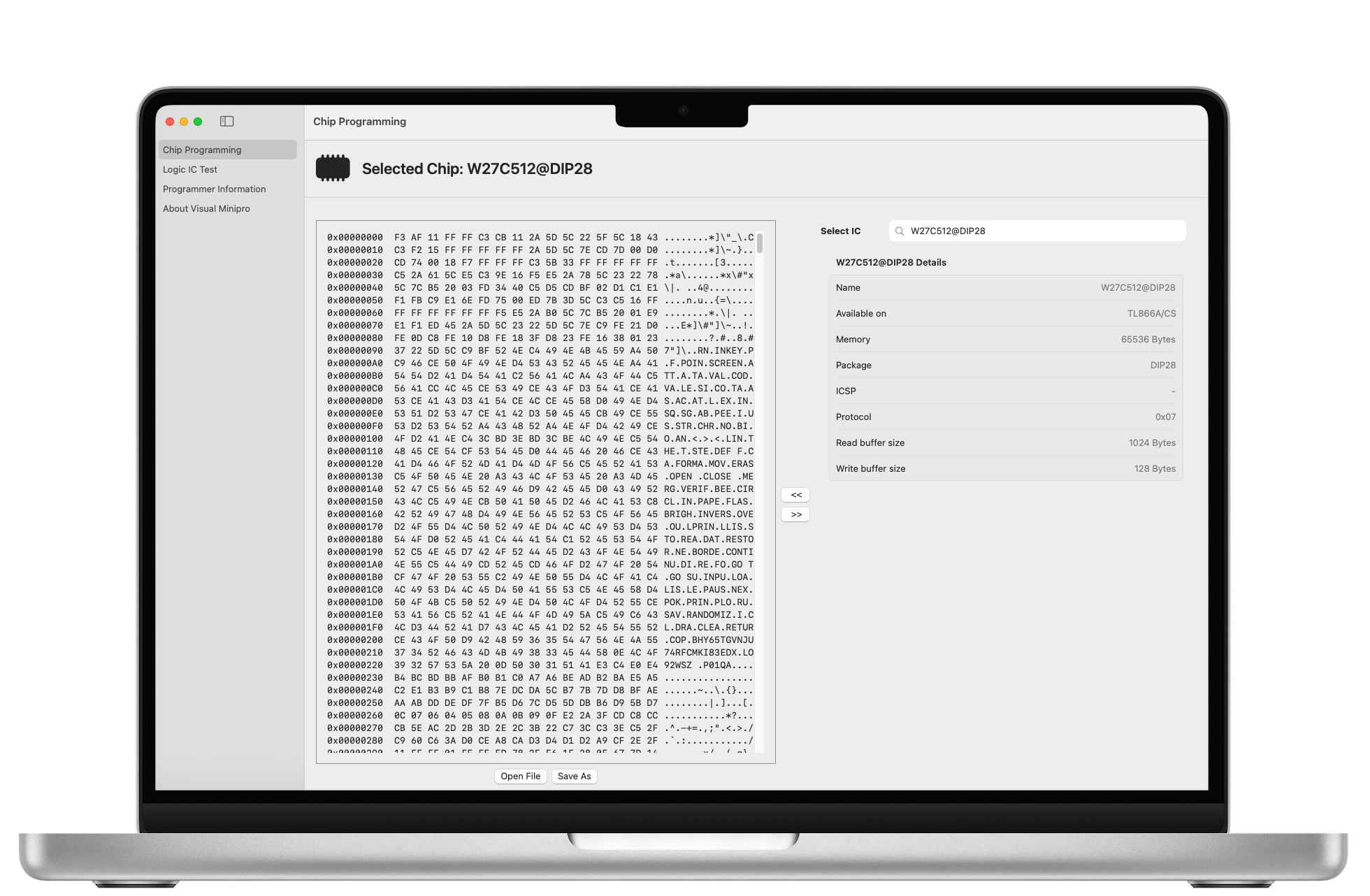
Why I built it

A while ago, I built a replica of a computer that’s older than internet (ZX Spectrum). Because the kit didn’t include the ROM (due to copyright), I essentially built a brick. I hastily ordered a T48 XGecu programmer to bring my new computer to life, but couldn’t make it work with my Mac.

I hoped to find a solution on the official website and was welcomed by this:
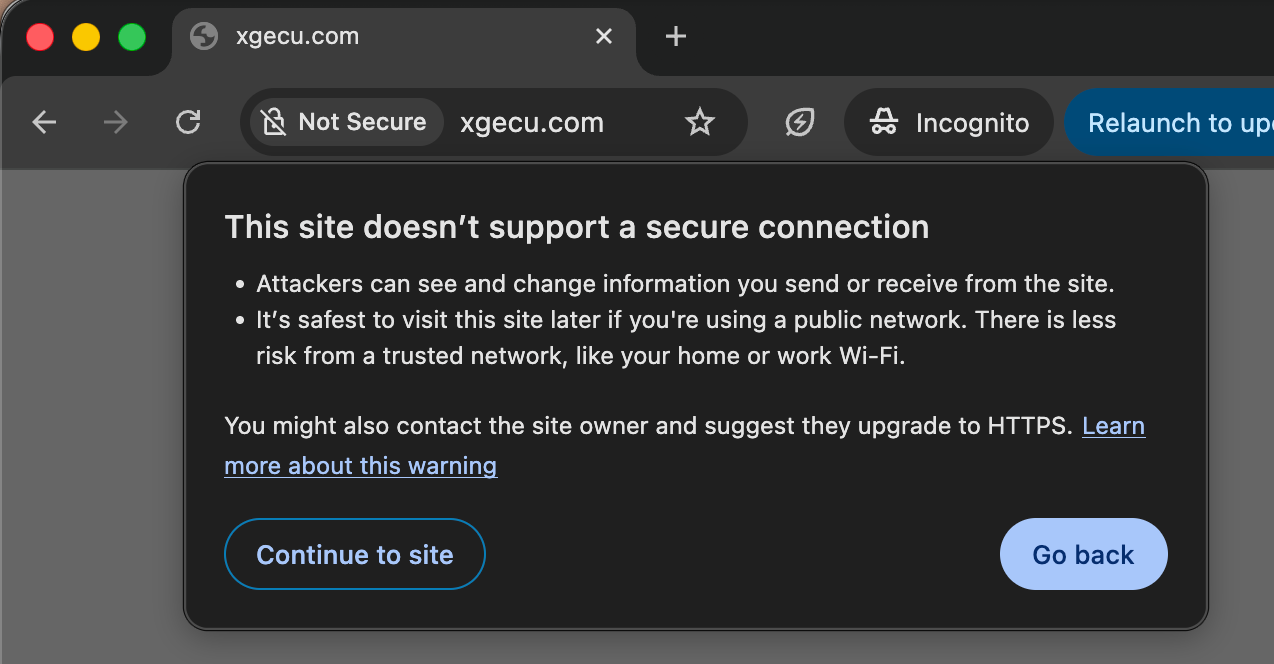
Despite a few red flags, I downloaded the software for my programmer:

It was a .RAR file and I knew what it meant – they only supported Windows!

As a long-time Mac user, I was disappointed. The prospect of installing Parallels only to use the programmer wasn’t appealing. Fortunately, I came across minipro – an open source, command line tool for handling XGecu programmers.

The tool did what it advertised and unblocked my project. However, the version available on brew was outdated and to get something newer, I had to compile it myself.

Parameters were another thing I fought with. I could not remember them and had to refer to man pages dozens of times.

This experience enlightened me – I couldn’t be the only Mac person in the world who wanted to use their XGecu programmer without time-wasting side quests.

The finish line that almost wasn’t

Starting the project took a couple months but finishing it almost didn’t happen.

Visual Minipro wraps the minipro tool. Building an MVP was relatively quick because minipro did all the heavy lifting. But the App Store doesn’t accept MVPs. All apps need to meet certain requirements to be accepted. Due to the app structure, satisfying these requirements was harder than I expected:

  • bundling – App Store apps are sandboxed and can’t access files outside of the sandbox. Ensuring that external tools and dynamic libraries can be loaded correctly is tricky.
  • signing – Apple requires all App Store apps to be signed. XCode handles signing the application but I couldn’t find a way to make it sign dependencies like mine.
  • permissions – the app got rejected by App Store twice due to permissions. One claim was valid (I thought I needed a permission while I didn’t) but the other was not and required a little back-and-forth to convince them that apps handling USB devices require the USB permission
  • universal binaries – the first version of the app only worked on Apple Silicon. I decided to add support for Intel based Macs after a few people asked for it. Building universal binaries for dependencies turned out to be a bit of work because their build scripts only supported the current architecture. Testing was even harder – I only had a no longer supported 2015 MacBook Pro where many newer SwiftUI features weren’t supported.

Solving these problems took enough of my time that I almost started working on a new idea. But I persevered and learned (or re-learned) a few things:

  • shipping software is hard
  • the last 10% takes more time than the first 90%
  • XCode works reasonably well for main scenarios but things get hairy when you get off the beaten path. Fortunately, Apple has command line tools accompanied by posts from around 2013 that explain how to deal with these scenarios (reading these posts is a pain)
  • the App Store app review is not as bad

Memorable moments

First Sale

My first sale surprised me. Not because it came so quickly, but because I learned about it from an unexpected channel after I almost forgot about Visual Minipro.

In the beginning, I was checking my stats daily hoping to see some movement. Looking at zero sold copies got boring and then even depressing, so I stopped. A few weeks later, I received a bug report claiming the app didn’t work. After a short investigation, I concluded the person was building the app from sources and didn’t correctly bundle minipro. I recommended getting the app from the App Store where I knew all components were bundled correctly. To my surprise, they said they did use the version from the App Store.

I checked the App Store dashboard – it did show one copy sold!

(and the problem turned out to be an environmental issue – the app worked fine on a different Mac)

Liquid Glass fiasco

In late December 2025 I noticed an increase in refund requests from App Store but couldn’t figure out the reason. Then, in January, I installed macOS 26 (Tahoe) on my Mac and it became obvious. Liquid Glass made my app look so bad that it became unusable – even I felt lost. I dropped everything and submitted a new, fixed version of the app the same evening.

App Store Small Business program

Seeing Apple taking 30% of $30 I made selling a couple copies of my app made me sad. Finding out they have a program that reduces their commission to 15% for small developers if you apply, made angry.

I heard about Apple introducing the App Store Small Business program as a side effect of the Epic Games v. Apple lawsuit. But it was in 2020 and I had long forgotten about it. I was reminded about the program by a random reddit post. I applied and forgot about it again because I didn’t hear back. It took Apple more than three weeks to process my application and confirm I was eligible.

Show me the money!

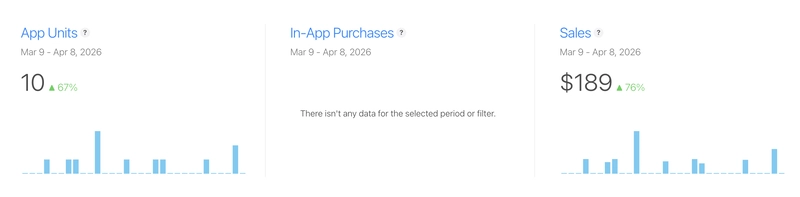
Visual Minipro is a niche app. I won’t claim it makes thousands of dollars in ARR or that it will allow me to retire early. It does, however, make enough to cover the cost of my domains, hosting and dev subscriptions.
Why I think the app sells?

I will be brutally honest – I found a few alternatives to Visual Minipro and they did look better. But all of them had the same fundamental problem: friction.
Assuming you even find one of these apps, the first step is to compile them. If you want to keep it up-to-date (if it’s still maintained) – you will have to periodically check for new releases and recompile them. As soon as get a new laptop, you guessed it right: you will have to compile it again, but first you need to find and install all tools and dependencies.

And, unless you read all the code carefully, you’ll never know what you’re compiling.

Getting an app from the App store is much more convenient and almost risk-free. No time wasted on figuring out dependencies and make files. Automatic updates. Clearly stated permissions. In the worst case, if you don’t like the app, you can request a refund.

What kept me going?

I almost gave up working on Visual Minipro several times. The two main reasons I didn’t:

  • Scratching your own itch – I wanted an app like this for myself. I find it useful, and even if no one buys it, I will keep using it.
  • Product/market fit – Visual Minipro is filling a real gap in the market. The XGecu programmers are quite popular and I was surprised they only supported Windows.

What’s next?

I am maintaining the Visual Minipro app by fixing issues and adding new features. These updates are primarily driven by user feedback and my own observations. I am also trying new ideas because this project taught me I am capable of finishing them.

Overthinking Software Projects

“Weeks of coding can save you hours of planning.”

Most developers learn this truth the hard way. I did when I implemented a feature based on incorrect assumptions, and the only way to save it was to rewrite it.

While junior engineers often fall into the trap of jumping straight to coding without thinking about the problem, more senior engineers fall into a different trap: overthinking.

Senior developers are routinely responsible for projects requiring a handful of engineers and a few months to complete. There is no way to execute these projects without careful thinking and planning. Even if you wanted to start coding on the first day, you couldn’t. You simply wouldn’t know where to start.

The top priority in the initial phases of bigger software projects is to sort out the ambiguity that blocks development. The most common way to do this is to devise a design that will guide the implementation.

The tricky part is that figuring out the design is by itself an ambiguous problem. There is usually more than one way to implement the solution, and many constraints and requirements are unclear. Even estimating how long it will take to prepare the design can be difficult.

All these uncertainties put pressure on the engineer(s) responsible for the project. Making a bad decision can lead to wasted time (amplified by the size of the team) or even a project failure.

The “Am I Overthinking This?” book cover
The “Am I Overthinking This?” book cover.

When stakes are high, it is natural to proceed carefully, explore potential problems, and work with others to identify gaps that may otherwise go unnoticed. However, setting limits for these activities is crucial. Failing to do so will inevitably lead to overthinking, which can also put the project at risk due to:

  • Delays – analyzing every imaginable scenario takes a long time and will eat into development time, making meeting expected timelines impossible.
  • Overengineering – trying to address minor or hypothetical issues leads to overly complex designs that are hard to implement and expensive to maintain.
  • Missed opportunity – endless discussions, revisions, and feedback rounds steal time engineers could spend on other project activities or elsewhere.

How do you know if you are overthinking?

One of the problems with overthinking is that the line between productive analysis and overthinking is thin and easy to miss. However, there are signs of getting there:

  • Although all critical requirements have been satisfied, new requirements are being added.
  • The same topics continue to be discussed repeatedly without reaching any resolution.
  • Edge cases, minor issues, and esoteric scenarios start to dominate the discussion.
  • The debate moves to future scenarios that are out of the scope of the project at hand.

What to deal with overthinking?

It is important to understand that the goal of the planning and design phases is not to identify and solve all possible problems. First, it is impossible even to list all the issues. No matter how much time you spend thinking you will miss something. Second, many problems will never materialize, or if they do, their impact will be minimal. To focus on what’s important, create a list of requirements, decide which are critical (the list should be short), and satisfy those. Leave out the remaining ones and revisit them if they become a major problem.

Many problems have no one correct or even best solution. No amount of debate is going to change that. It may take time to arrive at this conclusion, but once it is settled, you must pick one of the alternatives and live with the consequences.

If you are not sure, prototype. An hour of coding can save you a few hours of meetings. Code does win arguments.

Design for your current needs. If you don’t operate at Facebook’s scale, don’t design for Facebook’s scale. Don’t build abstractions for your hypothetical future features.

Accept the fact that things may not work out. Fortunately, you are not pouring concrete. This is software, and the ability to modify it is one of its greatest advantages. You can build small and evolve your solution when your needs grow.

Build vertically. A small feature working end-to-end will allow you to discover issues early and course-correct. If you build horizontally, you won’t see gaps until very late when all the layers are ready. Fixing bigger problems at this stage will be an undertaking.

Want your productivity to skyrocket? Avoid this trap!

As a junior engineer, I felt the urge to jump on each new project that showed on the horizon. I never checked what I already had on my plate. Inevitably, I ended up with too many projects to work on simultaneously. Whenever my manager or a customer mentioned one of my projects, I immediately switched to it to show I was making progress. It took me years to realize that while this approach pleased the customer or the manager (and saved my junior dev butt) for the moment, it quietly hurt everyone.

The three-line execution graph

Executing multiple projects of the same priority at the same time looks like this:

Three line graph - non-focused

Initially, there are two projects: Project A and Project B. You start working on Project A, but after a while, you receive a call from the customer inquiring about the progress of Project B. To make this customer happy, you switch to project B. In the meantime, a new interesting project, C, pops up. It is cool and seems small, so you pick it up. Your manager realizes that project A is dragging and asks about it. You somehow manage to finish your toy project C and move to A, which is well past the deadline. Then you pick B again.

If you didn’t jump from project to project, the execution could look like this:

Three-line graph focused

If you compare these graphs, three things stand out in the second scenario:

  • Overall, the execution took less time. Resuming a paused project requires time to remember where the project was left off and get in the groove, i.e., to switch the context, which , which is time-consuming.
  • Projects A and B finished much quicker than in the first case. While you didn’t make customer B feel good by saying you were working on their project, ultimately, the project was completed sooner. In fact, both projects, A and B, were finished much sooner than they would have if you bounced between them.
  • Project C came in late, so it should wait unless it is a much higher priority than other projects. Otherwise, it disrupts the execution of these projects.

I know that life is not that simple. Completely avoiding context switching is rarely possible. But if you can limit it, your productivity will dramatically increase.

Does it mean you should only work on one thing at a time?

In the past I thought a good solution for junior engineers to combat context switching was to ask them to work on just one project at a time. But this idea has a serious drawback – projects often get stuck due to factors outside our control. If this happens and there is no backup, idling until the issue gets resolved is a waste of time.

Having two projects with different priorities works best. You execute on the higher-priority project whenever you can. If you can’t, you turn to the other project until the main project gets unblocked.

What I like about this approach is that it is always clear what to work on: the higher priority project wins unless working on it is impossible.

Falling back to the lower priority project means there might be some context switching. While it is not ideal, it is better than idly waiting until the issues blocking the main project are resolved.

But my TL (Tech Lead) always works on five projects!

Indeed, experienced senior and staff engineers often work on a few projects at the same time. In my experience, however, it is a different kind of work. It might be preparing a high-level design, working on an alignment with a partner team, breaking projects into smaller tasks, and tracking the progress.

The secret is that most of these activities don’t require as much focus as coding. Handling a few of them at the same time is much more manageable because the cost of switching contexts is much lower.

A simple way to ship maintainable software

This was my first solo on-call shift on my new team. I was almost ready to go home when a Critical alert fired. I acknowledged it almost instantly and started troubleshooting. But this was not going well. Wherever I turned, I hit a roadblock. The alert runbook was empty. The dashboards didn’t work. And I couldn’t see any logs because logging was disabled.

Some team members were still around, and I turned to them for help. I learned that the impacted service shipped merely a week before, and barely anyone knew how it worked. The person who wrote and shipped it was on sick leave.

It took us a few hours to figure out what was happening and to mitigate the outage. This work made one thing apparent – this service was not ready for the prime time.

In the week following the incident, we filled the gaps we had found during the outage. Our main goal was to ensure that future on-calls wouldn’t have to scramble when encountering issues with this service.

But the bigger question left unanswered was: how can we avoid similar issues with any new service or feature we will ship in the future?

The idea we came up with was the Service Readiness Checklist.

What is the Service Readiness Checklist?

The Readiness Checklist is a checklist that contains requirements each service (or a bigger feature) needs to meet to be considered ready to ship. It serves two purposes:

  • to guarantee that none of the aspects related to operating the service have been forgotten
  • to make it clear who is responsible for ensuring that requirements have been reviewed and met

When we are close to shipping, we create a task that contains a copy of the readiness checklist and assign it to the engineer driving the project. They become responsible for ensuring all requirements on the checklist.

Having one engineer responsible for the checklist helps avoid situations where some requirements fall through the cracks because everyone thought someone else was taking care of them. The primary job of this engineer is to ensure all checkboxes are checked. They may do the work themselves if they choose to or assign items to people involved in the project and coordinate the work.

Occasionally, the checklist owner may decide that some requirements are inapplicable. For example, the checklist may call for setting up deployment, but there is nothing to do if the existing deployment infrastructure automatically covers it.

The checklist will usually contain more than ten requirements. They are all obvious, but it is easy to miss some just because of how many there are.

Example readiness checklist

There is no single readiness checklist that would work for every team because each team operates differently. They all follow different processes and have their own ways of running their code and detecting and troubleshooting outages. There is, however, a common subset of requirements that can be a starting point for a team-specific readiness checklist:

  • [ ] Has the service/feature been introduced to the on-call?
  • [ ] Has sufficient documentation been created for the service? Does it contain information about dependencies, including the on-calls who own them?
  • [ ] Does the service have working dashboards?
  • [ ] Have alerts been created and tested?
  • [ ] Does the service/feature have runbooks (a.k.a. playbooks)?
  • [ ] Has the service been load tested?
  • [ ] Is logging for the service/feature enabled at the appropriate level?
  • [ ] Is automated deployment configured?
  • [ ] Does the service/feature have sufficient test coverage?
  • [ ] Has a rollout plan been developed?

Success story

Our team was tasked to solve a relatively big problem on tight timelines. The solution required building a pipeline of a few services. Because we didn’t have enough people to implement this infrastructure within the allotted amount of time, we asked for help. Soon after, a few engineers temporarily joined our team. We were worried, however, that this partnership may not work out because of the differences in our engineering cultures. The Service Readiness Checklist was one of the things (others included coding guidelines, interface-based programming, etc.) that helped set clear expectations. With both teams on the same page, the collaboration was smooth, and we shipped the project on time.

Do code reviews find bugs?

I recently overheard this: “Code reviews are a waste of time – they don’t find bugs! We should rely on our tests and skip all this code review mambo-jumbo.”

And I agree – tests are important. But they won’t identify many issues code reviews will. Here are a few examples.

Unwanted dependencies

Developers often add dependencies they could easily do without. Bringing in libraries that are megabytes in size only to use one small function or relying on packages like true may not be worth the cost. Code reviews are a great opportunity to spot new dependencies and discuss the value they bring.

Potential performance issues

In my experience, most automated tests use only basic test inputs. For instance, tests for code that operates on arrays rarely use arrays with more than a few items. These inputs might be sufficient to test the basic functionality but won’t put the code under stress.

Code reviews allow spotting suboptimal algorithms whose execution time rapidly grows with the input size or scenarios prone to combinatorial explosion.

The latter bit our team not too long ago. When reviewing a code change, one of the reviewers mentioned the possibility of a combinatorial explosion. After discussing it with the author, they concluded it would never happen. Fast forward a few weeks, and our service occasionally uses 100% CPU before it crashes due to running out of memory. Guess what? The hypothetical scenario did happen. Had we analyzed the concern mentioned in the code review more thoroughly, we would’ve avoided the problem completely.

Code complexity and readability

Computers execute all code with the same ease. They don’t care what it looks like. Humans are different. The more complex the code, the harder it is to understand and correctly modify. Code review is the best time to identify code that will become a maintenance nightmare due to its complexity and poor readability.

Missing test coverage

The purpose of automated tests is to flag bugs and regressions. But how do we ensure that these tests exist in the first place? Through a code review! If test coverage for a proposed change is insufficient, it is usually enough to ask in a code review for improving it.

Bugs? Yes, sometimes.

Code reviews do find bugs. They don’t find all of them, but any bug caught before it reaches the repository is a win. Code reviews are one of the first stages in the software development process making them the earliest chance to catch bugs. And the sooner a bug is found, the cheaper it is to fix.

Conclusion

Tests are not a replacement for code reviews. However, code reviews are also not a replacement for tests. These are two different tools. Even though there might be some overlap, they have different purposes. Having both helps maintain high-quality code.

Storytime

One memorable issue I found through a code review was the questionable use of regular expressions. My experience taught me to be careful with regular expressions because even innocent-looking ones can lead to serious performance issues. But when I saw the proposed change, I was speechless: the code generated regular expressions on the fly in a loop and executed them.

At that time, I was nineteen years into my Software Engineering career (including 11 years at Microsoft), and I hadn’t seen a problem whose solution would require generating regular expressions on the fly. I didn’t even completely understand what the code did, but I was convinced this code should never be checked in (despite passing tests). After digging deeper into the problem, we found that a single for loop with two indices could solve it. If not for the code review, this change would’ve made it to millions of phones, including, perhaps, even yours, because this app has hundreds of millions of downloads across iOS and Android.