Support for .NET Framework 4 – the NuGet package now contains two versions of the second level cache assembly – one that is specific to .NET Framework 4 and one that is specific to .NET Framework 4.5. As a result it is now possible to use second level caching in EF 6.1 applications that target .NET Framework 4. (A side note: you should update NuGet packages if you change the .NET Framework version your application targets to avoid errors where (some of) the referenced assemblies target a different version of .NET Framework than the app itself).
Support for async (.NET Framework 4.5 only) – results for queries executed asynchronously are now cached.
The CachingPolicy and the DefaultCachingPolicy classes merged
The CachingPolicy.CanBeCached method was modified to take the Sql query and parameters. This enables more granular control over the cached results. Note that this is a breaking change from alpha release and you will need to update your code if you created a custom CachingPolicy derived class
A new mechanisms allowing excluding caching results for specific queries.
Let’s take a closer look at the last two items. They allow achieving a similar goal but in different ways. Starting from the Beta version the SQL query and query parameters are passed to the CanBeCached method in addition to the store entity sets (which are abstractions of database tables). This allows for inspecting the query and its parameters to decide whether the results yielded by the query should be cached. “Inspecting the query and its parameters” may sound easy but the queries generated by EF tend to be complicated and parsing them may not be trivial. Easier cases are where you just have some queries you never want to cache the results for and instead of “inspecting” you just need to compare if the input query is one of these non-cacheable queries
and if it is return false from the method.
(Side note: I personally believe that with regards to caching you are most often interested in tables the results come from and not in what the query does. In this scenario the affectedEntitySets might be more helpful because you can get the names of the tables used in the query without having to try to actually reverse engineer the query. You can get the names of the tables used in the query as follows:
).
Another way to prevent results for a specific query from being cached is to use the new built-in mechanism which for blacklisting queries. This mechanism consists of two parts – a registrar that contains a list of blacklisted queries (i.e. queries whose results won’t be cached) and the DbQuery.NotCached() (and ObjectQuery.NotCached()) extension methods which make using the registrar easier. As a result blacklisting a query is as easy as appending .NotCached() to the query, just like this:
var q = ctx.Entities.Where(e => e.Flag != null).OrderBy(e => e.Id).NotCached();
Blacklisted queries take precedence (i.e. win) over caching policy and therefore the CachingPolicy.CanBeCached() method will never be called for blacklisted queries.
The registrar itself is public and implements the singleton pattern. You can get the instance using the BlacklistedQueriesRegistrar.Instance property and then you will be able to register (or unregister) blacklisted queries manually (note however that queries are compared using string comparison and therefore the registered query must exactly match the query EF would produce – the extension methods ensure the queries are identical by calling .ToString()/.ToTraceString() on the DbQuery/ObjectQuery instance).
As you can see both CachingPolicy.CanBeCached() and the built-in query blacklisting mechanism allow to prevent results for specific queries from being cached. The difference is that the built-in mechanism is very simple to use but does not give the flexibility and granularity offered by the CachingPolicy.CanBeCached() method. On the other hand the flexibility and granularity of the CachingPolicy.CanBeCached() method is not for free – you need to implement at least some logic yourself.
The road to “RTM”.
I consider the Beta version to be feature complete. I am planning to let it bake for a few weeks, fix reported issues and then release the final version. Your part is to try out the Beta version (or upgrade your projects) and report bugs.
About a week ago I published on NuGet the Alpha-2 version of the EFCache. It does not contain a whole lot of new things. In fact it contains just one change – a fix to a bug which prevented from using the cache with databases containing null values. This bug was reported by multiple people and was quite easy to hit since having null values in the database is a very common scenario. The best part of the story is that I actually did not code the fix myself. The fix was kindly contributed by Teoni Valois. Teoni also created an EFCache implementation called DacheCache which uses Dache – a distribute cache for .NET – as the caching mechanisms. You can get DachCache from NuGet.
Again, thanks for the contribution and reporting issues (yes, the version for .NET Framework 4 will be included in the upcoming Beta release). If you hit the bug and gave up on using EFCache give the Alpha-2 a try.
Until Entity Framework 6.1 was released store functions (i.e. Table Valued Functions and Stored Procedures) could be used in EF only when doing Database First. There were some workarounds which made it possible to invoke store functions in Code First apps but you still could not use TVFs in Linq queries which was one of the biggest limitations. In EF 6.1 the mapping API was made public which (along with some additional tweaks) made it possible to use store functions in your Code First apps. Note, that it does not mean that things will start working automagically once you upgrade to EF6.1. Rather, it means that it is now possible to help EF realize that it actually is capable of handling store functions even when Code First approach is being used. Sounds exciting doesn’t it? So, probably the question you have is:
How do I do that?
To understand how store functions could be enabled for Code First in EF 6.1 let’s take a look first at how they work in the Database First scenario. In Database First you define methods that are driving the execution of store functions in your context class (typically these methods are generated for you when you create a model from the database). You use these methods in your app by calling them directly or, in case of TVFs, in LINQ queries. One thing that is worth mentioning is that these methods need to follow certain conventions otherwise EF won’t be able to use them. Apart from methods defined in your context class store functions must also be specified in the artifacts describing the model – SSDL, CSDL and MSL (think: edmx). At runtime these artifacts are loaded to MetadataWorkspace object which contains all the information about the model.
In Code First the model is being built from the code when the application starts. Types are discovered using reflection and are configured with fluent API in the OnModelCreating method, attributes and/or conventions. The model is then loaded to the MetadataWorkspace (similarly to what happens in the Database First approach) and once this is done both – Code First and Database First operate in the same way. Note that the model becomes read-only after it has been loaded the MetadataWorkspace.
Because Database First and Code First converge at the MetadataWorkspace level enabling discovery of store functions in Code First along with additional model configuration should suffice to add general support for store functions in Code First. Model configuration (and therefore store function discovery) has to happen before the model is loaded to the MetadataWorkspace otherwise the metadata will be sealed and it will be impossible to tweak the model. There are three ways we can configure the model in Code First – configuration attributes, fluent API and conventions. Attributes are not rich enough to configure store functions. Fluent API does not have access to mapping. This leaves conventions. Indeed a custom model convention seems ideal – it gives you access to the model which in EF 6.1 not only contains conceptual and store models but also modifiable mapping information. So, we could create a convention which discovers methods using reflection, then configures store and conceptual models accordingly and defines the mapping. Methods mapped to store functions will have to meet some specific requirements imposed by Entity Framework. The requirements for methods mapped to table valued functions are the following:
return type must be an IQueryable<T> where T is a type for which a corresponding EDM type exists – i.e. is either a primitive type that is supported by EF (for instance int is fine while uint won’t work) or a non-primitive type (enum/complex type/entity type) that has been configured (either implicitly or explicitly) in your model
method parameters must be of scalar (i.e. primitive or enum) types mappable to EF types
methods must have the DbFunctionAttribute whose the first argument is the conceptual container name and the second argument is the function name. The container name is typically the name of the DbContext derived class however if you are unsure you can use the following code snippet to get the name:
the name of the method, the value of the DbFunction.FunctionName and the queryString name passed to the CreateQuery call must all be the same
in some cases TVF mapping may require additional details – a column name and/or the name of the database schema. You can specify them using the DbFunctionDetailsAttribute. The column name is required if the method is mapped to a TVF that returns a collection of primitive values. This is needed because EF requires providing the name of the column containing the values and there is no way of inferring this information from the code and therefore it has to be provided externally by setting the ResultColumnName property of the DbFunctionDetails attribute to the name of the column returned by the function. The database schema name needs to be specified if the schema of the TVF being mapped is different from the default schema name passed to the convention constructor and can be done by setting the DatabaseSchema property of the DbFunctionDetailsAttribute.
The requirements for methods mapped to stored procedures are less demanding and are the following:
the return type has to be ObjectResult<T> where T, similarly to TVFs, is a type that can be mapped to an EDM type
you can also specify the name of the database schema if it is different from the default name by setting the DatabaseSchema property of the DbFunctionDetailsAttribute. (Because of how the result mapping works for stored procedures setting the ResultColumnName property has no effect)
The above requirements were mostly about method signatures but the bodies of the methods are important too. For TVFs you create a query using the ObjectContext.CreateQuery method while stored procedures just use ObjectContext.ExecuteFunction method. Below you can find examples for both TVFs and stored procedures (also notice how parameters passed to store functions are created). In addition the methods need to be members of the DbContext derived type which itself is the generic argument of the convention.
Currently only the simplest result mapping where names of the columns returned from the database match the names of the names of the properties of the target type (except for mapping to scalar results) is supported. This is actually a limitation in the EF Code First where more complicated mappings would currently be ignored in most cases even though they are valid from the MSL perspective. There is a chance of having more complicated mappings enabled in EF 6.1.1 if appropriate changes are checked in by the time EF 6.1.1 ships. From here there should be just one step to enabling stored procedures returning multiple resultsets in Code First.
Now you probably are a bit tired of all this EF mumbo-jumbo and would like to see
The Code
To see the custom convention in action create a new (Console Application) project. Once the project has been created add the EntityFramework.CodeFirstStoreFunctions NuGet package. You can add it either from the Package Manager Console by executing
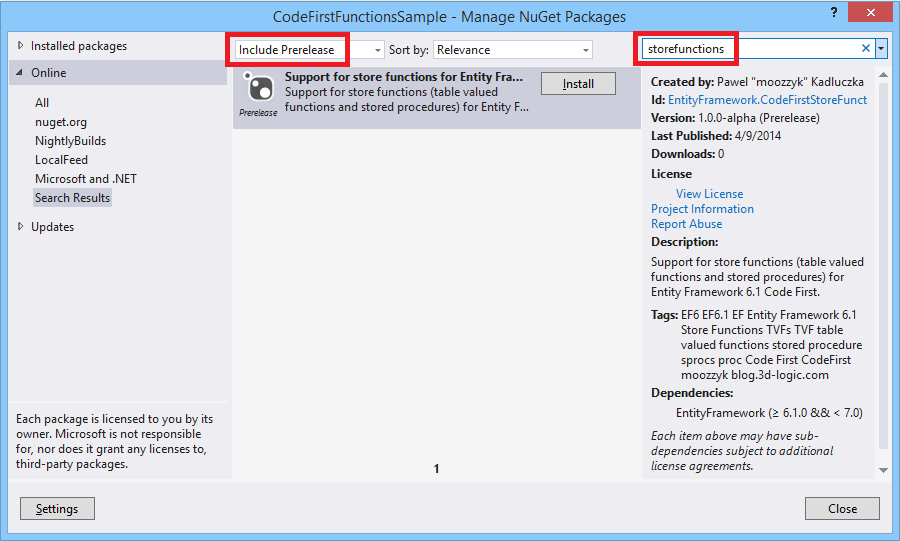
command or using the UI – right click the References in the solution explorer and select “Manage NuGet Packages”, then when the dialog opens make sure that the “Include Prerelease” option in the dropdown at the top of the dialog is selected and use “storefunctions” in the search box to find the package. Finally click the “Install” button to install the package.
Installing EntityFramework.CodeFirstStoreFunctions from UI
After the package has been installed copy and paste the code snippet from below to your project. This code demonstrates how to enable store functions in Code First.
public class Customer
{
    public int Id { get; set; }

    public string Name { get; set; }

    public string ZipCode { get; set; }
}

public class MyContext : DbContext
{
    static MyContext()
    {
        Database.SetInitializer(new MyContextInitializer());
    }

    public DbSet<Customer> Customers { get; set; }

    protected override void OnModelCreating(DbModelBuilder modelBuilder)
    {
        modelBuilder.Conventions.Add(new FunctionsConvention<MyContext>("dbo"));
    }

    [DbFunction("MyContext", "CustomersByZipCode")]
    public IQueryable<Customer> CustomersByZipCode(string zipCode)
    {
        var zipCodeParameter = zipCode != null ?
            new ObjectParameter("ZipCode", zipCode) :
            new ObjectParameter("ZipCode", typeof(string));

        return ((IObjectContextAdapter)this).ObjectContext
            .CreateQuery<Customer>(
                string.Format("[{0}].{1}", GetType().Name,
                    "[CustomersByZipCode](@ZipCode)"), zipCodeParameter);
    }

    public ObjectResult<Customer> GetCustomersByName(string name)
    {
        var nameParameter = name != null ?
            new ObjectParameter("Name", name) :
            new ObjectParameter("Name", typeof(string));

        return ((IObjectContextAdapter)this).ObjectContext.
            ExecuteFunction<Customer>("GetCustomersByName", nameParameter);
    }
}

public class MyContextInitializer : DropCreateDatabaseAlways<MyContext>
{
    public override void InitializeDatabase(MyContext context)
    {
        base.InitializeDatabase(context);

        context.Database.ExecuteSqlCommand(
            "CREATE PROCEDURE [dbo].[GetCustomersByName] @Name nvarchar(max) AS " +
            "SELECT [Id], [Name], [ZipCode] " +
            "FROM [dbo].[Customers] " +
            "WHERE [Name] LIKE (@Name)");

        context.Database.ExecuteSqlCommand(
            "CREATE FUNCTION [dbo].[CustomersByZipCode](@ZipCode nchar(5)) " +
            "RETURNS TABLE " +
            "RETURN " +
            "SELECT [Id], [Name], [ZipCode] " +
            "FROM [dbo].[Customers] " +
            "WHERE [ZipCode] = @ZipCode");
    }

    protected override void Seed(MyContext context)
    {
        context.Customers.Add(new Customer {Name = "John", ZipCode = "98052"});
        context.Customers.Add(new Customer { Name = "Natasha", ZipCode = "98210" });
        context.Customers.Add(new Customer { Name = "Lin", ZipCode = "98052" });
        context.Customers.Add(new Customer { Name = "Josh", ZipCode = "90210" });
        context.Customers.Add(new Customer { Name = "Maria", ZipCode = "98074" });
        context.SaveChanges();
    }
}

class Program
{
    static void Main()
    {
        using (var ctx = new MyContext())
        {
            const string zipCode = "98052";
            var q = ctx.CustomersByZipCode(zipCode)
                .Where(c => c.Name.Length > 3);
            //Console.WriteLine(((ObjectQuery)q).ToTraceString());
            Console.WriteLine("TVF: CustomersByZipCode('{0}')", zipCode);
            foreach (var customer in q)
            {
                Console.WriteLine("Id: {0}, Name: {1}, ZipCode: {2}",
                    customer.Id, customer.Name, customer.ZipCode);
            }

            const string name = "Jo%";
            Console.WriteLine("\nStored procedure: GetCustomersByName '{0}'", name);
            foreach (var customer in ctx.GetCustomersByName(name))
            {
                Console.WriteLine("Id: {0}, Name: {1}, ZipCode: {2}",
                    customer.Id, customer.Name, customer.ZipCode);
            }
        }
    }
}
In the code above I use a custom initializer to initialize the database and create a table-valued function and a stored procedure (in a real application you would probably use Code First Migrations for this). The initializer also populates the database with some data in the Seed method. The MyContext class is a class derived from the DbContext class and contains two methods that are mapped to store functions created in the initializer. The context class contains also the OnModelCreating method where we register the convention which will do all the hard work related to setting up our store functions. The Main method contains code that invokes store functions created when initializing the database. First, we use the TVF. Note, that we compose the query on the function which means that the whole query will be translated to SQL and executed on the database side. If you would like to see this you can uncomment the line which prints the SQL query in the above snippet and you will see the exact query that will be sent to the database:
SELECT
    [Extent1].[Id] AS [Id],
    [Extent1].[Name] AS [Name],
    [Extent1].[ZipCode] AS [ZipCode]
    FROM [dbo].[CustomersByZipCode](@ZipCode) AS [Extent1]
    WHERE ( CAST(LEN([Extent1].[Name]) AS int)) > 3
(Back to the code) Next we execute the query and display results. Once we are done with the TVF we invoke the stored procedure. This is just an invocation because you cannot build queries on top of results returned by stored procedures. If you need any query-like (or other) logic it must be inside the stored procedure itself and otherwise you end up having a Linq query that is being run against materialized results. That’s pretty much the whole app. Just in case I am pasting the output the app produces below:
Note that in both examples the return types are based on entity types. As I hinted above you can also use complex and scalar types for your results. Take a look at the End-to-End tests in the project itself – all scenarios are tested there.
That’s about what’s in alpha, so you may ask:
what’s next?
If you look at the code there are a few TODOs in the code. One of the most important is the support for nullable parameters. I am also thinking of removing the limitation where the method name in your DbContext derived class must ultimately match the name of the TVF in the database. If the workitem 2192 is resolved for the next version of EF I will be able to add support for non-default mapping. In addition I think it is very close from workitem 2192 to supporting stored procedures returning multiple resultsets. Not sure how useful it would be but it would be cool to see support for this feature which currently is kind of a dead feature because it is supported neither by CodeFirst nor by EF tooling.
Anything else?
The project is open source and is hosted on codeplex. You can get the sources from here. Try it and let me know what you think.
Currently Entity Framework does not natively support second level caching. For pre-EF6 versions you could use EF Caching Provider Wrapper but due to changes to the EF provider model in EF6 it does not work with newest versions of EF. In theory it would be possible to recompile the old caching provider against EF6 but, unfortunately, this would not be sufficient. A number of new features breaking some assumptions made in the old caching provider (e.g. support for passing an open connection when instantiating a new context) have been introduced in EF6 resulting in the old caching provider not working correctly in these scenarios. Also dependency injection and Code-based Configuration introduced in EF6 simplify registering wrapping providers which was rather cumbersome (especially for Code First) in the previous versions. To fill the gap I created the Second Level Cache for EF 6.1 project. It’s a combination of a wrapping provider and a transaction handler which work together on caching query results and keeping the cache in a consistent state. In a typical scenario query results are cached by the wrapping caching provider and are invalidated by the transaction handler if an entity set on which cached query results depend was modified (note that data modification in EF always happens in a transaction hence the need of using transaction handler).
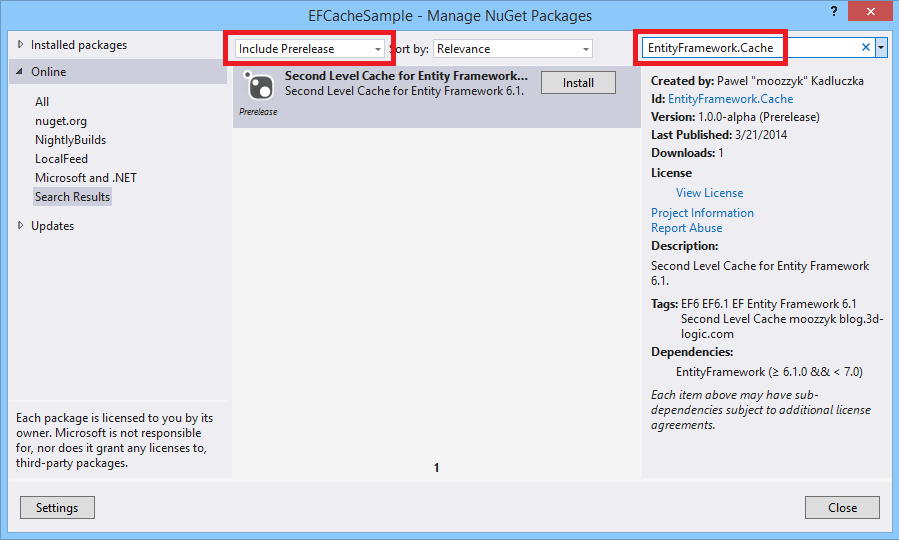
Using the cache is easy but requires a couple steps. First you need to install the EntityFramework.Cache NuGet package. There are two ways to do this from Visual Studio. One way to do this is to use the UI – right click the References node in the Solution Explorer and select the Manage NuGet Packages option. This will open a dialog you use to install NuGet packages. Since the project is currently in the alpha stage you need to select “Include Prelease” in the drop down at the top. Then enter “EntityFramework.Cache” in the search window and, once the package appears, click the “Install” button.
Installing EntityFramework.Cache from UI
You can also install the package from the Package Manager Console. Open the Package Manager Console (Tools → NuGet Package Manager → Package Manager Console) and execute the following command: Install-Package EntityFramework.Cache –Pre
(-Pre allows installing pre-release packages).
Note that the package depends on Entity Framework 6.1. If you don’t have Entity Framework 6.1 in your project it will be automatically installed when you install the EntityFramework.Cache package.
Once the package is installed you need to tell EF to use caching by configuring the caching provider and the transaction handler. You do this by creating a configuration class derived from the DbConfiguration class. In the constructor of your DbConfiguration derived class you need to set the transaction interceptor and the Loaded event handler which will be responsible for replacing the provider. Here is an example of how to setup caching which uses the built-in in-memory cache implementation and the default caching policy.
public class Configuration : DbConfiguration
{
  public Configuration()
  {
    var transactionHandler = new CacheTransactionHandler(new InMmemoryCache());

    AddInterceptor(transactionHandler);

    Loaded +=
      (sender, args) => args.ReplaceService<DbProviderServices>(
        (s, _) => new CachingProviderServices(s, transactionHandler,
          new DefaultCachingPolicy()));
  }
}
The default caching policy used above is part of the project and allows caching all query results regardless of their size or entity sets used to obtain the results. Both, sliding and absolute, expiration times in the default caching policy are set to maximum values therefore items will be cached until an entity set used to obtain the results depended on is modified. If the default caching policy is not suitable for your needs you can create a custom caching policy in which you can limit what will be cached. To create a custom policy you just need to derive a class from the CachingPolicy class, implement the abstract methods, and pass the policy to the CachingProviderServices during registration. When implementing a custom caching policy there is one thing to be aware of – the expired entries are removed from the cache lazily. It means that an entry will be removed by the caching provider only when the caching provider tries to read the entry and finds it is expired. This is not extremely helpful (especially because since the item is expired the provider will query the database to get fresh results which will be then put to the cache – so effectively the expired entry will be replaced with a new entry) but lets the user decide what the best strategy of cleaning the cache in their case is. For instance, in the InMemoryCache implementation included in the project I created a Purge method. This method could be periodically called to remove stale cache entries.
The project also includes a simple implementation of a cache which caches query results in memory. This is just a sample implementation and if you would like to use a different caching mechanism you are free to do so – you just need to implement the ICache interface. This interface is a slightly modified version of the interface that shipped with the original EF Caching Provider Wrapper which should make moving existing apps using the old caching solution to EF6 easier.
As the old saying goes “A program is worth a 1000 words“, so let’s take a look at the second level cache in action. Here is a complete sample app which is using the cache:
public class Airline
{
  [Key]
  public string Code { get; set; }

  public string Name { get; set; }

  public virtual ICollection<Aircraft> Aircraft { get; set; }
}

public class Aircraft
{
  public int Id { get; set; }

  public string EquipmentCode { get; set; }

  public virtual Airline Airline { get; set; }
}

public class AirTravelContext : DbContext
{
  static AirTravelContext()
  {
    Database.SetInitializer(new DropCreateDatabaseIfModelChanges<AirTravelContext>());
  }

  public DbSet<Airline> Airlines { get; set; }

  public DbSet<Aircraft> Aircraft { get; set; }
}

public class Configuration : DbConfiguration
{
  public Configuration()
  {
    var transactionHandler = new CacheTransactionHandler(Program.Cache);

    AddInterceptor(transactionHandler);

    Loaded +=
      (sender, args) => args.ReplaceService<DbProviderServices>(
        (s, _) => new CachingProviderServices(s, transactionHandler));
  }
}

class Program
{
  internal static readonly InMemoryCache Cache = new InMemoryCache();

  private static void Seed()
  {
    using (var ctx = new AirTravelContext())
    {
      ctx.Airlines.Add(
        new Airline
        {
          Code = "UA",
          Name = "United Airlines",
          Aircraft = new List<Aircraft>
          {
            new Aircraft {EquipmentCode = "788"},
            new Aircraft {EquipmentCode = "763"}
          }
        });

      ctx.Airlines.Add(
        new Airline
        {
          Code = "FR",
          Name = "Ryan Air",
          Aircraft = new List<Aircraft>
          {
            new Aircraft {EquipmentCode = "738"},
          }
        });

      ctx.SaveChanges();
    }
  }

  private static void RemoveData()
  {
    using (var ctx = new AirTravelContext())
    {
      ctx.Database.ExecuteSqlCommand("DELETE FROM Aircraft");
      ctx.Database.ExecuteSqlCommand("DELETE FROM Airlines");
    }
  }

  private static void PrintAirlinesAndAircraft()
  {
    using (var ctx = new AirTravelContext())
    {
      foreach (var airline in ctx.Airlines.Include(a => a.Aircraft))
      {
        Console.WriteLine("{0}: {1}", airline.Code,
          string.Join(", ", airline.Aircraft.Select(a => a.EquipmentCode)));
      }
    }
  }

  private static void PrintAirlineCount()
  {
    using (var ctx = new AirTravelContext())
    {
      Console.WriteLine("Airline Count: {0}", ctx.Airlines.Count());
    }
  }

  static void Main(string[] args)
  {
    // populate and print data
    Console.WriteLine("Entries in cache: {0}", Cache.Count);
    RemoveData();
    Seed();
    PrintAirlinesAndAircraft();

    Console.WriteLine("\nEntries in cache: {0}", Cache.Count);
    // remove data bypassing cache
    RemoveData();
    // not cached - goes to the database and counts airlines
    PrintAirlineCount();
    // prints results from cache
    PrintAirlinesAndAircraft();
    Console.WriteLine("\nEntries in cache: {0}", Cache.Count);
    // repopulate data - invalidates cache
    Seed();
    Console.WriteLine("\nEntries in cache: {0}", Cache.Count);
    // print data
    PrintAirlineCount();
    PrintAirlinesAndAircraft();
    Console.WriteLine("\nEntries in cache: {0}", Cache.Count);
  }
}
The app is pretty simple – a couple of entities, a context class, code base configuration (should look familiar), a few methods and the Main() method which drives the execution. One method that is worth mentioning is the RemoveData() method. It removes the data from the tables using the SqlExecuteMethod() therefore bypassing the entire Entity Framework update pipeline including the caching provider. This is to show that the cache really works but is at the same type a kind of warning – if you bypass EF you will need to make sure the cache is in a consistent state or you can get incorrect results. Running the sample app results in the following output:
Entries in cache: 0
FR: 738
UA: 788, 763
Entries in cache: 3

Removing data directly from the database
Airline Count: 0
FR: 738
UA: 788, 763

Entries in cache: 4

Entries in cache: 2
Airline Count: 2
FR: 738
UA: 788, 763

Entries in cache: 4
Press any key to continue . . .
Let’s analyze what’s happening here. On line 1 we just report that the cache is empty (no entries in the cache). Seems correct – no queries have been sent to the database so far. Then we remove any stale data from the database, seed the database, and print the contents of the database (lines 2 and 3). Printing the content of the database requires querying the database which should result in some entries in the cache. Indeed on line 4 three entries are reported to be in the cache. Why three if we sent just one query? If you peek at the cache with the debugger you will see that two of these entries are for the HistoryContext so three seems correct. Now (line 6) we delete all the data in the database so when we query the database for the airline count (line 7) the result is 0. However, even though we don’t have any data in the database, we can still print data on lines 8 and 9. This data comes from the cache – note that when we deleted data we used ExecuteSqlCommand() method which bypassed the EF update pipeline and, as a result, no cache entries were invalidated. On line 11 we again report the number of items in the cache. This time the cache contains four entries – two entries for the HistoryContext related queries, one entry for the data that was initially cached and one entry for the result of the query where we asked for the number of airlines in the database. Now we add the data to the database again and again print the number of items in the cache on line 13. This time the number of entries is two. This is because inserting the data to the database invalidated cached results for queries that used either Airlines or Aircraft entity sets and as a result only the results related to the HistoryContext remained in the cache. We again query the database for the number of airlines (line 14) and print all the data from the database. The results for both queries are added to the cache and we end up having four entries in the cache again (line 18).
That’s pretty much it. Try it out and let me what you think (or report bugs). You can also look at and play with the code – it is available on the project website on codeplex.
Note that this version is an alpha version and there is still some work remainig before it can be called done – most notably support for async methods, adding some missing overrides for the ADO.NET wrapping classes. I am also considering adding support for TransactionScope.
To be able to work with different databases Entity Framework abstracts the store as a set of views which are later used to create queries and CUD (Create/Update/Delete) commands. EF generates views the first time it needs them (typically on the first query). For bigger or more complicated models view generation may take significant time and negatively impact the startup time of the application. This can be worked around by generating views at design time (e.g. using EF Power Tools or my T4 templates for generating views) and compiling them into you EF app.
Notes:
There were significant improvements to view generation in EF6 (and more is coming), so make sure using pre-generated views visibly improve the startup time of your app – if they are not – don’t bother.
In EF6 (6.0.0 and 6.0.1) we saw several performance regressions (mostly in Code First) that affected the startup time of apps. They were not related to view generation (which in fact in most cases was faster than it was in EF5) so adding pre-generated views does not help. Many of these were fixed in 6.0.2. Always make sure you are running the latest bits and again check if view generation helps – if it does not – don’t bother.
So, for bigger models pre-generated views can help. But they are a bit bothersome. You need to remember about regenerating them each time your model changes. They add to the build time. They make your project more complicated. Not having to worry about views (especially that they are just an implementation detail that ideally would not be even exposed publicly if view generation did not impact the startup performance) makes the life of the developer much easier. Can we somehow combined these two worlds (and not in the way that the manual work done at design time impacts the startup time of the application :))? For instance, what if EF could check at runtime if up-to-date views are available and then use them if they are, or – if no usable views are available – it generates new views and stores them so that they are used the next time the application is run? This way the first time your app starts it will spend some time creating views (this time has to be spent somewhere anyways) but then (assuming the model has not changed) it will just use the views created when the app was run the first time which should result in faster startup time for subsequent runs. Sounds nice doesn’t it? And it actually is now possible. With the EFInteractiveViews NuGet package I published recently you can achieve all this with just a couple lines of code!
So, how does this work?
Assuming you have an existing EF6 application add the EFInteractiveViews NuGet packageto your project – you can right click on the References node in your project, select “Manage NuGet Packages” and add the NuGet package from the UI, or use the following command from the Package Manager Console:
Install-Package EFInteractiveViews
Once you add the package you need to decide where you want to store your views – you can use either a file or the database. If you want to store views in a file add the following code to your app:
using (var ctx = new MyContext())
{
    InteractiveViews
        .SetViewCacheFactory(
            ctx,
            new FileViewCacheFactory(@"C:\MyViews.xml"));
}
Note that this code has to be executed before EF needs views (typically before you send the first query or the first call to the .SaveChanges() method) so make sure it is in the right place (for instance in a static constructor). The above line registers a view cache factory. Now if EF needs views it will first ask the registered view cache factory for views. The FileViewCacheFactory tries to load views from the file – if the file exists and the views match the model it will return views and EF will not need to generate views. If, however, the file does not exist or the views are outdated the FileViewCacheFactory will generate views, save them to the file and return them to EF.
Storing views in a file is kind of cool but since this is an EF app it has to have a database. Therefore storing views in the database would be even cooler. And this actually is possible – you just need to register a different view cache factory included in the package:
using (var ctx = new MyContext())
{
    InteractiveViews
        .SetViewCacheFactory(
            ctx,
            new SqlServerViewCacheFactory(ctx.Database.Connection.ConnectionString));
}
Similarly to the FileViewCacheFactory you need to register the SqlServerViewCacheFactory before EF needs views. One more assumption the SqlServerViewCacheFactory makes is that the database exists (if this is not the case and you are using CodeFirst you can create one with ctx.Database.Initialize(force)). The SqlServerViewCacheFactory creates a table in your database to store views. By default the table will be called __ViewCache and will be in the dbo schema. You can change the defaults by passing the name of the table and/or schema in the SqlServerViewCacheFactory constructor.
As you probably guessed the SqlServerViewCacheFactory class is Sql Server specific. What if you are using a different back end? That’s not a big deal too. Create a new class derived from the DatabaseViewCacheFactory and implement three simple abstract methods – CreateConnection(), ViewTableExists() and CreateViewTable() and you are done. Since the EF Interactive Views project is open source you can take a look how I did it for SqlServer. (and yes, the DatabaseViewCacheFactory uses EF6 under the cover to get and update views in the database).
Words of precaution
When using interactive views make sure that you are not running different versions of an app (with different models) against the same database (CodeFirst typically does not allow this unless you are not using an initializer). If you do one version of an app will create views and then the other will not be able to use them so they will be overwritten which will make the views unusable for the version that ran originally and there will be no benefit in using interactive views at all.

 Code, the Universe and Everything...