What changed in the EF Tooling in Visual Studio 2013 (and Visual Studio 2012 Out Of Band)

The recently shipped version of Visual Studio 2013 contains a new version of EF Tooling (a standalone version for Visual Studio 2012 is also available for download). The main goal of this release was to teach the EF designer how to talk to both EF5 and EF6. It was quite an undertaking given how EF6 differs from EF5 (binary incompatible, no correspondence between provider models and metadata workspace, EF6 runtime assemblies no longer in GAC just to name a few differences) and required changes to the existing functionality. Some of these changes may be confusing to people who used previous versions of EF tooling. The goal of this post is to take a look what has changed, why, and how it works now.
Before EF6 things were reasonably straightforward – from the EF Tooling standpoint there could be only one version of the EF runtime installed on the box – EF1, EF4 or EF5. In addition it was easy to determine the version of EF just by looking at the installed version of the .NET Framework – .NET Framework 3.5 meant EF1, .NET Framework 4 meant EF4 and .NET Framework 4.5 meant EF5. Note that the designer did not need to distinguish between EF4.x versions (treated as EF4) or EF5 for .NET Framework 4 (also treated as EF4) since they were built on top of the core EF runtime version residing in GAC. The installed (GAC’ed) version of the EF runtime automatically implied the latest supported version of Csdl, Ssdl, Msl and Edmx (‘schemas’ as we internally call them) since each version of the core EF runtime introduced a new version of schemas. But then happened EF6 – no longer in GAC, works on .NET Framework 4 and .NET Framework 4.5 (also meaning you could have v3 schemas on .NET Framework 4), binary incompatible with earlier versions of EF, some types moved to new/different namespaces, etc. The only way for tooling to be able to handle all of this was to break a number of assumptions made in the designer and, in some cases, change how the designer works. Below is a list of things that changed the most with a short explanation why they changed and what to expect:

  • For Model First the code is no longer generated when adding an empty model to the project. This is probably the most confusing change (funnily it was internally reported to me as a bug multiple times even before we shipped the new EF Tooling the first time in Visual Studio 2013 RC). The reason for this change is simple – since some types in EF6 were moved to different namespaces the code we used to generate for EF5 no longer works with EF6 (and vice versa). In some cases (e.g. you don’t have a reference to any EF runtime in your project) it is just impossible to tell whether the user is going it need EF5 or EF6 code. The most interesting part is that the code for we used to add when creating an empty model was is in reality not that useful before the database was created – yes, you could write code against the generated context/entities but you would not be really able to run it without the database. Therefore, we changed the workflow a bit and now the code generation templates are added when you create the database from model instead of when you add an empty model to your project because the wizard will make you select the version of EF you would like to use in your project, if there already isn’t one.
  • Code Generation Strategy disabled for EF6 models. Again this is partially related to changes to types and namespaces. Code generated for EF5 would not work with EF6. In addition the code we generate for ObjectContext based context and EntityObject based entities for EF5 (and earlier) applications is generated using System.Data.Entity.Design.dll. System.Data.Entity.Design.dll is part of the .NET Framework and does not fit into the EF6 shipping model. Therefore instead of updating System.Data.Entity.Design.dll we decided to support only T4 template based code generation for EF6. EF Tooling ships with T4 templates for generating DbContext based context and POCO entities. If, for some reason, you absolutely need ObjectContext based context the EF6 templates were posted on VS Gallery. For EF5 (or earlier) applications the Code Generation Strategy drop down is not blocked and you can choose between T4 and LegacyObjectContext (yes, we changed the option names as well because they were a bit ridiculous in VS2012 where ‘None’ basically meant T4 and ‘Default’ meant ObjectContext but the ‘None’ option was default).
  • Impossible to select the version of Entity Framework. To determine the applicable version of EF the designer looks for references to EntityFramework.dll and System.Data.Entity.dll in the project (note that EntityFramework.dll wins over System.Data.Entity.dll when determining the version). If it cannot find any, the user has to select the version in the wizard. Otherwise the latest version of EF found in the project is being used and the selection will not be possible (radio buttons will be disabled or the wizard page will not be shown at all).
  • Using third party providers. In the simple days of EF5 (and earlier) EF providers were registered globally and you could get one basically anytime and anywhere. Those days are long gone. In EF6 EF providers don’t have a global registration point. Rather, they are registered in the config file or using code based configuration. When you select a connection in the wizard the designer tries to find a reference to a corresponding provider in your project. If it cannot find one you won’t be able to use EF6 – instead you will be asked to close the wizard, install the provider and restart the wizard (note that this does not apply to the provider for Sql Server – EF Tooling contains EF6 provider for Sql Server which in the majority of cases make things easier for the user).
  • Retargeting. Depending on the referenced version of Entity Framework in the project changing the target .NET Framework version for the project may but may not change the edmx file. If the project references System.Data.Entity.dll and does not reference EF6 retargeting will result in upgrading/downgrading the version of the edmx file to match the latest supported version of the schema for the given .NET Framework and, as a result, EF runtime version. If the project contains a reference to EF6 toggling the target between .NET Framework 4 and .NET Framework 4.5 will not result in changing the edmx version since EF6 is supported on both versions and understands v3 schemas. Targeting .NET Framework 3.5 should always downgrade to v1 since EF1 is the only version available on .NET Framework 3.5. One caveat to retargeting is that you should always update your NuGet packages after retargeting. This is because EF (and potentially other packages) has a different assembly for .NET Framework 4 and for .NET Framework 4.5 (one of the reasons is that Async is not natively supported on .NET Frramework 4) and even though they are both shipped in the same NuGet package, NuGet does not replace project references after changing the target .NET Framework version. This leads either to missing functionality (e.g. Async not available on .NET Framework 4.5 (when using EF6 for .NET Framework 4 on .NET Framework 4.5)) or weird build errors saying you don’t have reference to EntityFramework.dll (only running MsBuild /v:diag will tell you that the reference you have was ignored since the referenced EntityFramework.dll was built for a later version of .NET Framework than the one the project is currently targeting (happens when using EF6 for .NET Framework 4.5 on .NET Framework 4)).
  • Using EF6 and EF5/EF4 in one project. Initially we did not want to support this scenario at all. However it is not only pretty easy to end up in such a situation but supporting this would also be helpful for people wanting to gradually move legacy, bigger projects from EF5 to EF6, so finally we decided to do what we can to support mixed EF versions in one project. The most important thing the designer has to do to handle this scenario correctly is to ensure that the right provider is being used for a given edmx file. Also, the version of the edmx file needs to be in sync with the referenced version of the EF runtime. Seems easy at first but there are some cases where things may behave a bit weird. A canonical example is when you have a project targeting .NET Framework 4 and you don’t have a reference to any Entity Framework runtime. When you create a new model it will create a v2 edmx since this was the latest supported schema version in .NET Framework 4. Now you create a database from your model and select EF6. Since EF6 supports v3 schemas the version of your edmx file will be changed to v3. Because the number of dimensions for versioning scenarios ended up being bigger than we originally expected and had a number of exceptions on top of that it was initially hard to tell what the outcome for each combination should be. To address this I created a set of rules which were much easier to understand and to follow when working on versioning scenarios. You can find these rules here.
  • In-the-box packages are not the latest available. EF Tooling contains EF6 NuGet packages that will be added to the project when adding a new model if needed. However, since EF Tooling ships with Visual Studio which has a different cadence that EF the included packages may not be the latest ones. In fact in case of EF6 we fixed a few (mostly performance related) bugs after Visual Studio 2013 was locked down. As a result version 6.0.1 of EF was shipped on the same day as Visual Studio 2013 but the version of EF that ships with Visual Studio 2013 is 6.0.0 and does not contain fixes included in 6.0.1. Moreover 6.0.2 is on its way and again – it will be a runtime only release. Updating EF package is as easy as running the following command from Package Manager Console (Tools → Library Package Manager → Package Manager Console)
    Update-Package EntityFramework
EF6 CodeFirst View Generation T4 Template for C# updated for EF6 RTM

The story around pre-generated views in pre-release versions of EF6 was far from glorious. First, things did not work in EF6 Beta1 due to this bug. Then the bug was fixed but due to other changes in this area pre-generated views were broken again in EF6 RC1 (mainly because of the combination of this and this). Because of the issues in the EF6 RC1 I decided not to post the version I had – it just did not work. Finally, it turned out that due to changes in the EF Tooling shipping with Visual Studio 2013 the template did not want to work on Visual Studio 2013 (or Visual Studio 2012 where the new tooling is available out-of-band). That’s a pretty interesting story on its own but for me it meant that I basically had to rewrite the template. Today EF6 has finally landed (btw. Visual Studio 2013 shipped today too) Since the bugs around pre-generated views were fixed I updated the EF6 Code First T4 template for generating views and posted the latest version on the Visual Studio Gallery. The template should work on Visual Studio 2010, Visual Studio 2012 and Visual Studio 2013 and for EF6 RTM and nightly builds. If you need steps to install and use the template take a look at this post.
A couple additional notes:
– an updated version of EF Power Tools which allows generating views (and more) directly from Visual Studio version was shipped recently
– view generation in EF6 has been greatly improved so maybe you don’t really need to use pre-generated views?

(Because you read this post you might be interested in this.)

T4 Templates for Generating Views for EF4/EF5 Database/Model First apps

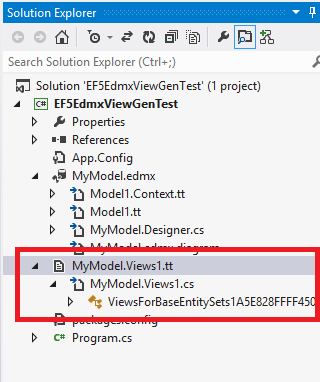
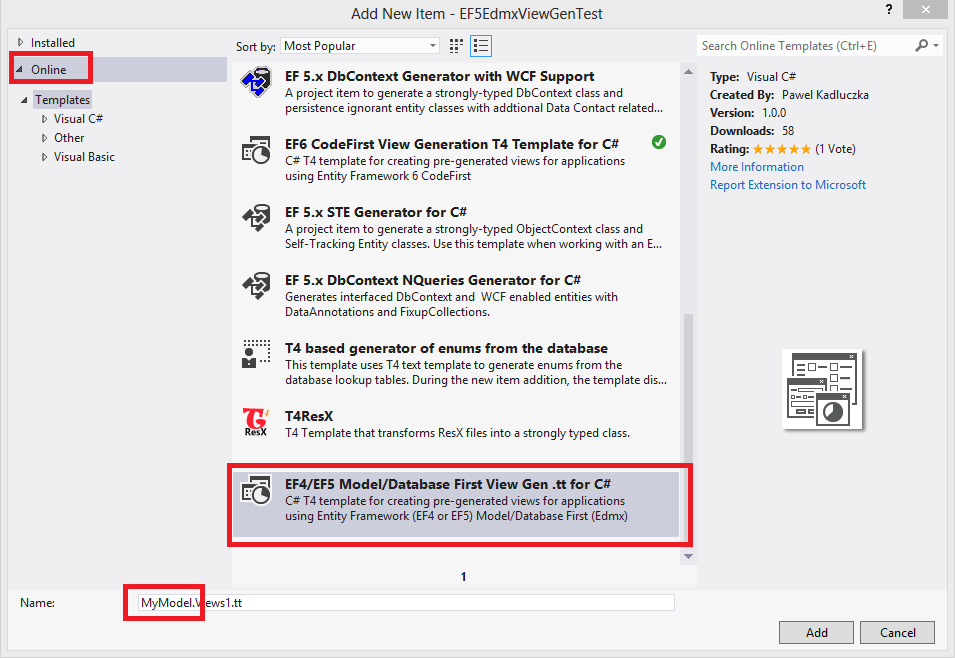
After we received a comment on the EF team blog asking why the templates for generating views for Edmx based apps we posted years ago were not updated for EF5 Rowan asked me if I it would be possible to update the template so that it works for EF5. I actually remember looking at this template before I shipped my templates generating views for Code First apps and one of the first things I noticed was that the way it handled versions was robust but not very flexible. Therefore, when we shipped EF5, the templates could not be used with apps using v3 of the EF artifacts (edmx). I thought a bit more about this when I was working on the templates for CodeFirst and concluded that robustness is not really very important here. If someone wants views they will have to provide a valid model (be it Code First model or Edmx) or the APIs used for generating views will throw an exception. Since the exception will be displayed in the error pane (and should be understandable for any person who is trying to use pre-generated views) there was no need to sacrifice flexibility for robustness. Also, the expierence of using the template was not very good. It was posted as a .zip file attached to a blog post. Not only wasn’t it discoverable but you would also have to take a number of extra steps to be able to use it. Visual Studio Gallery makes it much easier to find and use extensions like this, so I thought it was not a bad idea to revamp the template and ship it on the VS Gallery (especially given that I already have all the infrastructure needed to create a shippable .VSIX files containing a T4 templates). The only thing I was missing was the template itself. Luckily(?) I was investigating a bug which I thought could be worked around by using pre-generated views. After I finished up coding the template it turned out that this is not the case (i.e. you cannot use pre-generated views if you have QueryViews in your mapping) but at least I had a T4 template for generating views for Database/Model First apps. Now I only had to marry the infrastructure for building .vsix with the template and call it done (I went a bit further and even created a VB.Net version of the template). Since yesterday the templates are available on Visual Studio Gallery – the C# version can be found here and the VB.Net version can be found here. Using the templates is simple. In Visual Studio right-click on your project and select Add→New Item (Ctrl+Shift+A). In the “Add New Item” window select “Online” on the left. You may want to filter by EF5 or edmx. Select the “EF4/EF5 Model/Db First View Gen .tt for {C#|VB.Net}”. Change the name of the .tt file so that it starts with the name of your edmx file (i.e. if your edmx file is called “MyModel.edmx” name the template “MyModel.Views.tt”) and press the “Add” button:

Add New Item - Edmx Views
Add New Item – Edmx Views

and that’s pretty much it – the template and a class containing views should now be added to your project:
Project with views
Project with views

If you want to enforce re-generating views (e.g. after the edmx file changed) just right click the .tt file and select “Run Custom Tool”.
If you need to uninstall the template go to Tools→Extensions and Updates… select the template from the list and click the “Uninstall” button.

My Late Reflections on T4

Friday the 13th – a perfect day for grumbling. And I mean it – it’s going to be counterproductive and is not going to help you with anything (at most you will be able to say “Me too!” or “I am not alone”). I am going to grumble about probably well known things and a few years too late. So if you are having a good day my advise would be to stop reading now. I typically don’t grumble but just move on but this time I already had the content so it made it easier. All this started with an email from a colleague from my old team looking for someone on the EF team who “owns” T4 templates. I answered that there is no such person since probably more than half people of the team had to deal with the templates so if he had any specific question he could send it to me and I would either answer or add to the thread someone who would be able to answer. It turned out that they had a tool that generates code – a kind of an .exe or something even worse (but not as bad as perl) and were looking at moving to T4 and he asked me what were my thoughts on this. The first thought was that moving to T4 was in general not a bad idea (and I still think it is given what they currently have). However when I started gathering “my thoughts” I concluded that every rose (even a dead one – pun intended) has its thorn.

  1. Out of the box a T4 template can spit just one file. This sucks a big time – you can end up having a file with hundreds of classes. There are some ways of working this around but they usually make your template cryptic and messy (as if it was already not the case) since all the logic has to live in the template itself
  2. Visual Studio does not have a built-in editor for T4. This makes it even harder to see what’s going on in the template (as if it was not hard enough). There are 3rd party tools/add-ons that provide syntax coloring and perhaps intellisense. I have not tried any them otherwise I could have one less thing to grumble about
  3. Developing T4 templates is messy. At first it feels a little bit like classic ASP. After a while you start adding some functions and soon the code looks pretty much like a classic ASP page which – when you scroll down – gradually turns into a kind of procedural code like C or Pascal. You could try using ttinclude but it does not help a lot – now ‘ASP’ is in one file and ‘Pascal’ in the other file
  4. If you have to ship templates generating code for both C# and VB.NET you most likely won’t be able to re-use most of the logic which means you have to replicate the code (as if shipping VB.NET version was not painful enough)
  5. T4 templates are basically not testable. To be able to write some kind of unit tests you would probably have to create a custom transformation host for testing. The problem is that even if you did that it does not solve the problem since T4 transformations can behave differently for different hosts so you would not be testing the thing the way it will eventually be used/executed anyways
  6. You supposedly can debug T4 templates. Realistically you can forget about it. For me it is like Santa – I know he exists but have never seen him. Maybe it works for very simple templates but once you start doing more complicated things it will just not work (never worked for me at least) and you will end up using “WriteLine” debugging – welcome to the nineteen-eighties
  7. If you screw something up, in the best case you will get an exception displayed in the error pane which – if you find the correct stack frame – sometimes can be even helpful. Otherwise you will just get a message saying “Error Generating Output” in your output file – and then you need to debug (see above)
  8. Some more advanced things may be impossible – I recently tried to spin a new AppDomain to run some code I could not run inside the transformation app domain (have you seen how my view gen templates break when you install new EF Designer? – I wanted to fix that by using a separate app domain) and had to give it up. Could not make it work since I did not have enough control over generating the class that included my transformation code, nor how the transformation is being run
  9. People are afraid of T4 and don’t realize that they can actually modify the template they added to the project and it will not break their Visual Studio. I think this is because of what they see when they open a T4 template first time (did I mention it looks messy and cryptic – especially if you don’t have syntax coloring?)
  10. It’s nice that you can ship T4 templates as vsix packages but Visual Studio is not really helpful in preparing those – at least I had to prepare the EF view gen templates mostly manually. I have been wanting to describe steps for shipping T4 templates as vsix files for a while but so far have not managed to

This is just grumbling – the T4 technology has been around for a while and my grumbling is not going to change anything there. I also don’t think there is anything better for text transformations that ships with Visual Studio so, as my mom would say, “if you can’t have what you like you have to like what you have”. Tomorrow will be a better day 🙂

EF Designer now supports EF6

Some time ago I showed how to hack the EF Designer shipped with Visual Studio 2012 to work with EF6. Those hacks should be no longer needed – last week we shipped Entity Framework 6 Beta1 which for the first time contains not only EF6 runtime but also contains tooling. The new EF Designer works with Visual Studio 2012 and replaces the designer that was originally shipped with Visual Studio 2012. Almost all the work we did was about adding support for EF6 – being able to handle new metadata types, using the new provider model, creating EF6 specific T4 templates etc. This work has not been completed yet and some scenarios like support for EF6 on .NET Framework 4 or using non-SqlServer (or SqlServerCE) providers when using EF6 are still not enabled but if you want to use model first/database first workflows with EF6 the Beta version is currently your best option. Note that even though this release is mostly about adding support for EF6 we are not abandoning EF5. For EF5 the EF Designer Beta 1 version supports all the scenarios that were supported by the previous versions. You choose the target version of Entity Framework in the wizard when adding a new model to your project (note that in some cases the choice is limited – e.g. if your project already has a reference to System.Data.Entity.dll you won’t be able to select EF6).

It’s not a June CTP kind of thing
EF6 runtime is no longer shipped as part of the .NET Framework and we did not have to do hacks we had to do when shipping tooling in June 2011 CTP. It means that it is easy to install the EF Designer Beta 1 but it is also easy to uninstall it and go back to the original designer shipped with Visual Studio 2012 – just go to Programs and Features, uninstall the new designer and repair Visual Studio and things should work as they did before.

How to get it?
Just go to the download center and install the msi.

We want your feedback
Since the new EF Designer is easy to install and uninstall and it supports all the scenarios supported by the old one I would like to encourage everyone to try it out and let us know about your experience (and issues). This is only a Beta version and we already know it has some rough edges but it may also have bugs we don’t not know about yet. Try it out and if you see something start a new discussion or create a new work item.