I believe in submitting clean and complete pull requests (PRs). I like PRs to compile without errors or warnings, include clear descriptions, and have good test coverage. However, there is one category of PRs where these standards do not apply – RFC (Request For Comments) PRs.
What are RFC PRs?
RFC PRs are PRs whose sole purpose is to help reach alignment and unblock development work.
When to send RFC PRs?
In my experience, sending RFC PRs can be particularly helpful in these situations:
When working in an unfamiliar codebase.
When trying to determine the best implementation approach, especially when there are several viable choices.
To clarify ideas that are easier to explain with code than with words
The first two scenarios are like asking: ‘This is what I am thinking. Is this going in the right direction? Any reasons why it wouldn’t work?’
The third one is often a result of a design discussion or a PR review. It is like saying: ‘I propose we approach it this way.’
The quality of RFC PRs
RFC PRs are usually created quickly to ask questions or demonstrate a point. These PRs are not expected to be approved, merged, or thoroughly reviewed, so there is little value in doing any work that does not directly contribute to achieving the goal. Adding test coverage is unnecessary, and the code does not even need to compile. For example, it is OK not to update most call sites after adding a function parameter.
I advise against trying to merge RFC PRs. Doing this rarely ends well. First, it is hard to change the reviewers’ perception after they saw the first quick and dirty iteration. Furthermore, comments from the initial attempt may mislead reviewers and cause unnecessary iterations. It is often easier to submit a new PR, even if an earlier RFC PR heavily inspires it.
Storytime
I used an RFC PR recently while researching how to integrate our services with a system owned by another team. The integration could be done in one of two ways: using a native client or an API call. The native client offered limited capabilities, but understanding the consequences of these limitations was difficult. I decided to send an RFC PR to get feedback on my approach and quickly learned that the client approach wouldn’t work and the reasons why.
In the last few months, I have published more than a dozen posts on dev.to. Soon after I started, I realized that the analytics provided out-of-the-box was missing some features. One that I have been missing the most is the ability to see a daily breakdown of read posts.
Fortunately, the UI is not the only way to access stats. They are also available via the DEV Community API (Dev.to API). I decided to spend a few hours this weekend to see what it would take to use the Dev.to API to build the feature I was missing the most. I wrote this post to share my learnings.
Project overview
For my project, I decided to build a JavaScript web application with the Express framework and EJS templates. I did this because I wanted a dashboard with some nice-looking graphs. After I started, I realized that building a dashboard would be a waste of time because printing the stats would yield almost the same result (i.e. I could ship without it). In retrospect, my prototype could have been just a command-line application, which would have halved my effort.
DEV Community API crash course
I learned most about what I needed by investigating how the DEV dashboard worked. Using Chrome Developer Tools, I discovered two endpoints that were key to achieving my goal:
retrieving a list of articles
getting historical stats for a post
Both endpoints require authorization. API authorization mandates setting the api-key header in the HTTP requests. To get your API Key, go to Settings, click on Extensions on the left side, and scroll to the DEV Community API Keys at the bottom of the page. Here, you can see your active keys or generate a new key:
Once you have your API key, you can send API requests using fetch as follows:
To retrieve a list of published articles, we need to send an HTTP Request to the articles endpoint:
https://dev.to/api/articles/me/published
A successful response is a JSON payload that contains details about published articles, including their IDs and titles.
Side note: there is a version of this API that does not require authorization. You request a list of articles for any user with the following URL: https://dev.to/api/articles?username=moozzyk
Fetching stats
To fetch stats, we need to send a request like this:
The start parameter indicates the start date, while the article_id defines which article we want the stats for.
Productivity tip
You can test APIs requested with the GET method by pasting the URL directly in the browser, as browser authorization does not rely on the api-key header.
<rant>
I found the DEV Community API situation quite confusing. I was pointed to Forem by a web search and initially did not understand the connection between dev.to and Forem. In addition, the Forem’s API page contradicts itself about which API version to use. Finally, it turned out that API documentation does not include the endpoints I use in my project (but hey, they work!).
</rant>
Implementation
Once I figured out the APIs, I concluded that I can implement my idea in three steps:
send a request to the articles endpoint to retrieve the list of articles
for each article, send a request to the analytics endpoint to fetch the stats
group stats by date and show them to the user
Throttling
In my first implementation, I created a fetch request for each article and used Promise.all to send all of them in parallel. I knew it was generally not a brilliant idea because Promise.all does not allow to limit concurrency, but I hoped it would work for my case as I had fewer than 20 articles. I was wrong. With this approach, I only got stats for at most two articles. All other requests were rejected with the 429: Too many requests errors. My requests were throttled even after I changed my code to send one request at a time. To fix this problem, I added delay between requests like this:
  const statResponses = [];
  // Poor man's rate limiting to avoid 429: Too Many Requests
  for (const article of articles) {
    const resp =
      await initiateArticleStatRequest(article, startDate);
    statResponses.push(resp.ok ? await resp.json() : {});
    await new Promise((resolve) => setTimeout(resolve, 200));
  }
This is not great but works good enough for a handful of articles.
Side note: I noticed that even the UI Dashboard fails to load quite frequently due to throttling
Result
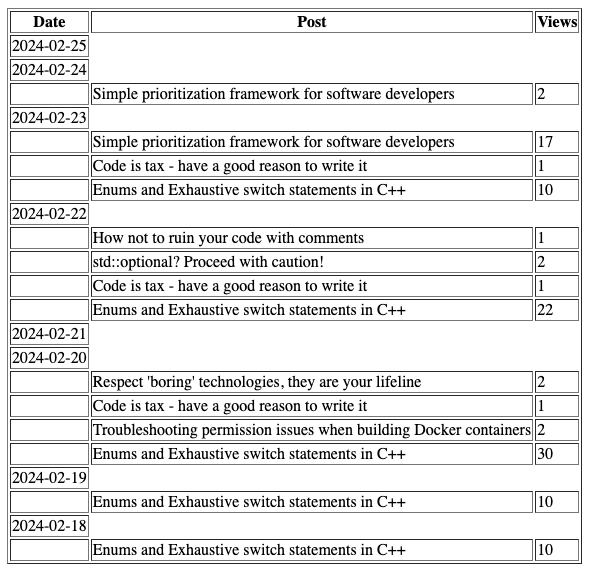
Here is the result – stats for my posts for the past seven days, broken by day:
It is not pretty, but it does have all the information I wanted to get.
Do It Yourself
If you want to learn more about the implementation or just try the project, the code is available on github.
Important: The app reads the API Key from the DEVTO_API_KEY environment variable. You can either set it before starting the app, or configure it in the .env file and start the app with node --env-file=.env index.js
Hopefully you found this useful. If you have any questions drop a comment below.
Prioritization is an essential skill for software developers, yet many find it challenging to decide what task to focus on next. In this post, I would like to share a simple prioritization method I have successfully used for years. It is particularly effective for simple tasks but can also be helpful in more complex scenarios.
Here is how it works
To determine what to work on, I look at my or my team’s tasks and ask: Can we ship without this? This question can be answered in one of the three ways:
No
Maybe (or It depends)
Yes
First, I look closely at tasks in the No bucket. I want to ensure they all are absolutely required. Sometimes, I find in this bucket tasks that are considered a must by the task owner but barely meet the Maybe bar from the product perspective. For example, it is hard to offer an online store without an inventory, but search functionality might not be needed for a niche store with only a handful of items.
Then, I look at Maybe tasks. Their initial priority is lower than the ones in the first bucket, but they usually require investigation to understand the trade-offs better. Once researched, they often can be immediately moved to one of the remaining buckets. If not, they should go to the Yes bucket until they become a necessity. For the online store example, a review system may be optional for stores selling specialized merchandise.
Tasks in the Yes bucket are typically nice-to-haves. From my experience, they usually increase code complexity significantly but add only minimal value. I prefer to skip these tasks and only reconsider them based on the feedback. An example would be building support for photos or videos for online store reviews.
The word ship should not be taken literally. Sometimes, it is about shipping a product or a feature, but it could also mean completing a sprint or finishing writing a design doc.
This framework works exceptionally well for work that needs to be finished on a tight timeline or for proof of concepts. In both cases, you need to prioritize ruthlessly to avoid spending time on activities that do not contribute directly to the goal. But it is also helpful for non-urgent work as it makes it easy to identify areas that should get attention first quickly.
Storytime
One example where I successfully used this framework was a project we worked on last year. We needed to build a streaming service that had to aggregate data before processing. We found that the streaming infra we used offered aggregation, but it was a new feature that had not been widely adopted. Moreover, the aggregation seemed very basic, and our estimations indicated it may not be able to handle our traffic volume.
After digging more, we learned that the built-in aggregation could be customized. A custom implementation seemed like a great idea because it would allow us to create a highly optimized aggregation logic tailored to our scenario.
This is when I asked: Can we ship without this?
At that point, we did not even have a working service. We only had a bunch of hypotheses we could not verify, and building the custom solution would take a few weeks.
From this perspective, a custom, performant implementation was not a must-have. Ensuring that the feature we were trying to use met our functional requirements was more important than its scalability. The built-in aggregation was perfect for this and did not require additional work.
We got the service working the same day. When we started testing it, we found that the dumb aggregation satisfied all our functional requirements. Surprisingly, it could also easily handle our scale, thanks to the built-in caching. One question saved us weeks of work, helped avoid introducing unneeded complexity, and instantly allowed us to verify our hypotheses.
Software developers are constantly bombarded with new, shiny stuff. Every day, there is a new gadget, JavaScript framework, or tool promising to solve all our problems. We want to use them all and cringe when we think about the boring technologies we use in our day-to-day jobs.
But we should love these boring technologies.
They get the job done. They pay the bills. They are there for us when we need them the most.
Most boring technologies have been around for years or even decades. They are versatile and battle-tested. Are they perfect? Absolutely not! They all have quirks and problems, but there are good reasons why they survived most of the contenders trying to replace them.
I don’t suggest that you avoid new technologies altogether. On the contrary, I encourage everyone to explore what’s new out there. You just need to know when to do this and understand the risks.
I recommend using mature technologies for risky, critical, or time-sensitive projects. When there is little margin for error, you want to use a reliable technology you understand and can work efficiently with. New technologies rarely meet these criteria.
Smaller or non-critical projects are perfect for trying something new and learning along the way, as long as you understand the consequences if things don’t work out. The most common issues with new, often unproven, technologies include:
trade-offs – you are trading a set of reasonably well-understood problems for a set of unknown problems
bugs or unsupported scenarios whose fixing is outside of your control
issues with no acceptable workarounds may block you or even force you to pivot to a different technology
poor documentation and support; limited online resources
the technology may unexpectedly lose support forcing you to either sunset your product or rewrite it completely
Occasionally, you will get lucky, and the new technology you bet on will become a ‘boring’ technology. I experienced this at my first job, where we decided to experiment with the .NET Framework. At that time, it was still in the Beta stage. Today, millions of developers around the world use the .NET Framework daily. I ended up working with it for more than 15 years. I even contributed to it after I joined Microsoft, where I worked on one of the .NET Framework teams.
I had less luck with my Swift SignalR client. For this project I needed WebSockets, but at that time, there was no support for a WebSocket API in the Apple ecosystem. I decided to use the SocketRocket library from Facebook to fill this gap. When my attempts to get help with a few issues failed, I realized that the SocketRocket library was no longer maintained. This lack of support forced me to look for an alternative. I soon found SwiftWebSocket, which I liked because it was small (just one file), popular, and still supported by the author. Moving to SwiftWebSocket required some effort but was successful. Fast forward a few years, and the library stopped compiling after I updated my XCode. I fixed the issues and sent a pull request to make my fixes available to everyone, but my PR didn’t receive attention. I also noticed that more users complained about the same issues I hit but were not getting any response. This unresponsiveness was a sign that the support for this library ended also (the author later archived the project). As I didn’t want to go through yet another rewrite, I forked the code, fixed compilation issues, and included this version in my project. Eventually, Apple added native support for WebSockets to the Foundation framework. Even though it was a lot of work, I was happy to migrate to this implementation because I was confident it would be the last time!
After submitting code for review, you will often receive requests to include fixes or improvements not directly related to the primary goal of your change. You can recognize them easily as they usually sound like: “Because you are touching this code, could you…?” and typically fall into one of the following categories:
Random bug fixes
Code refactoring
Fixing typos in code you didn’t touch
Design changes
Increasing test coverage in unrelated tests
While most of these requests are made in good faith and aim to improve the codebase, I strongly recommend against incorporating them into your current change for a couple of reasons:
You will trade an important change for a lower-priority one
Your main change was the reason why you opened the pull request. By agreeing to additional, unrelated changes, you sacrifice the more important change for minor improvements. How? The additional changes you agreed to will need at least one more round of code reviews, which can trigger further feedback and more iterations that will delay merging the main change.
I learned this lesson the hard way when I nearly missed an important deadline after agreeing to fix a ‘simple bug’ that was unrelated to the feature I was working on. Fixing the bug turned out much harder than initially perceived and caused unexpected test issues that took a lot of time to sort out. Just when I thought I was finished, I received more requests and suggestions. By the time I merged my pull request, I realized how close I had come to not delivering what I promised on time, only because I agreed to focus on an edge case that ultimately had minimal impact on our product.
You will dilute the purpose of the pull request
Ideally, each pull request should serve a single purpose. If it’s about refactoring, only include refactoring. If it’s fixing a bug, just fix the bug. This approach makes everyone’s job easier. It makes pull requests easier and quicker to review. Commits are less confusing when looked at months later and if you need to revert them, no other functionality is lost. All these benefits diminish if your pull request becomes a mixed bag of random code changes.
How to deal with incidental requests?
You have a few ways to proceed with suggestions you agree with. Usually, the best approach is to propose addressing them in separate pull requests. If your plate is full, log tasks or add them to the project’s backlog to tackle them later. Occasionally, a request may suggest a significant redesign that may fundamentally alter your work. If the idea resonates with you and won’t jeopardize your timelines, you might want to consider implementing it first and redo your changes on top of it.




 Code, the Universe and Everything...
