The self-inflicted pain of premature abstractions

Premature abstraction occurs when developers try making their code very general without a clear need. Examples of premature abstraction include:

  • Creating a base class (or interface) even though there is only one known specialization/implementation
  • Implementing a more general solution and using it for one purpose, e.g., coding the visitor pattern, only to check if a value exists in a binary search tree
  • building a bunch of microservices for an MVP (Minimum Viable Product) application serving a handful of requests per minute

I have seen many mid-level and even senior software developers, myself included, fall into this trap. The goal is always noble: to come up with a clean, beautiful, and reusable architecture. The result? An unnecessarily complex mess that even the author cannot comprehend and which slows down the entire team.

Why is premature abstraction problematic?

Adding abstractions before they are needed adds needless friction because they make the code more difficult to read and understand. This, in turn, increases the time to review code changes and risks introducing bugs just because the code was misunderstood. Implementing new features takes longer. Performance may degrade, thorough testing is hard to achieve, and maintenance becomes a burden.

Abstractions created when only one use case exists are almost always biased toward this use case. Adding a second use case to fit this abstraction is often only possible with serious modifications. As the changes can’t break the first use case, the new “abstraction” becomes an awkward mix of both use cases that don’t abstract anything.

With each commit, the abstraction becomes more rooted in the product. After a while, it can’t be removed without significantly rewriting the code, so it stays there forever and slows the team down.

I witnessed all these problems firsthand when, a few years ago, I joined a team that owned an important functionality in a popular mobile app. At that time, the team was migrating their code to React Native. One of the foundations for this migration was a workflow framework implemented by a couple of team members that was inspired by Operations from Apple’s Foundation Framework. When I joined the team, the workflow framework was a few weeks late but “almost ready.” It took another couple of months before it was possible to start using it to implement simple features. Only then did we find out how difficult it was! Even a simple functionality like sending an HTTP request required writing hundreds of lines of code. Simple features took weeks to finish, especially since no one was willing to invest their time reviewing huge diffs.

One of the framework’s features was “triggers,” which could invoke an operation automatically if certain conditions were satisfied. These triggers were a source of constant performance issues as they would often unexpectedly invoke random operations, including expensive ones like querying the database. Many team members struggled to wrap their heads around this framework and questioned why we needed it. Writing simple code would have been much easier, faster, and more enjoyable. After months of grinding, many missed deadlines, and tons of functional and performance issues, something had to be done. Unfortunately, it turned out that removing the framework was not an option. Not only did “the team invest so much time and effort in it,” but we also released a few features that would have to be rewritten. Eventually, we ended up reducing the framework’s usage to the absolute minimum for any new work.

What to do instead?

It is impossible to foresee the future, and adding code because it might be needed later rarely ends well. Rather, writing simple code, following the SOLID principles, and having good test coverage are encouraged. This way, you can add new abstractions later when you do need them without introducing regressions and breaking your app.

“When was the last time you used this?” – Part 1: Data Structures

A candidate recently asked me, “When was the last time you used this data structure, if ever?”

The candidate admitted that as someone who worked on company internal tools, they hadn’t needed to use more advanced data structures in years. They were genuinely curious about how often I dealt with problems where these data structures were useful.

Their question provoked me to review data structures I used at work, learned for interviews, or used to solve programming puzzles and think about how often I used them. I share my list below.

Caveat: Every software developer deals with different problems. I created the list based on my experience. If I haven’t used a data structure, it doesn’t mean that it is not used or not useful. Instead, it likely means I could solve my problems without it.

Dictionary

Dictionary is one of the most commonly used data structures. It can be applied to a wide range of problems. I use dictionaries daily.

Typical implementations of Dictionary use a hash table (with a linked list to handle collisions) or a balanced Binary Search Tree. Understanding the underlying data structure gives immediate insights into the cost of basic operations like insertion or lookup.

Nowadays, every modern programming language offers an implementation of Dictionary.

Set

Set is another data structure that I use very frequently. It is surprising how often we need to handle duplicates efficiently. Set shares a lot with Dictionary. These similarities make sense because Set could be considered a Dictionary without the value.

Linked list

I implemented linked lists several times at the beginning of my career over twenty years ago, but I haven’t needed to do this since. Many standard libraries include implementations of linked lists, but again, I don’t remember the last time I needed them.

Linked list-related questions used to be a staple of coding interviews, but fortunately, they are less popular these days.

Knowing how linked lists work could still be valuable because they are sometimes used to implement other data structures, such as stacks or queues.

Stack

While I rarely need to use stack directly, this data structure is extremely common.

Every program uses a stack to track invoked functions, parameter passing, and local data storage (the call stack).

Stack is a foundation for many algorithms, such as backtracking, tree traversal, and recursive algorithms. It is often used to evaluate arithmetic expressions and for syntax parsing. JVM (Java Virtual Machine) or CLR (Common Language Runtime) are implemented as stack machines.

Even though this happened long ago, I vividly remember reviewing a diff in which a recursive tree traversal was converted to the iterative version with explicit stack to avoid stack overflow errors for extremely deep trees.

Queue

Task execution management is one of the most common applications for queues: iOS uses the DispatchQueue, WebServers queue incoming requests, and drinks at Starbucks are prepared on the FIFO (First-In, First-Out) principle.

I also use queues most frequently for task execution. My second most frequent use is solving Advent of Code puzzles with BFS (Breadth First Search), which uses a queue to store nodes to visit.

An interesting implementation fact about queues is that they often use a circular buffer under the hood for performance reasons. Implementations using linked lists are usually slower due to allocating and deallocating each node individually.

Heap / Priority Queue

I don’t remember when I had to use the Heap data structure to solve a problem at work. I don’t feel too bad about this (except when I forgot about Heap during an interview). Microsoft added the PriorityQueue type only in .NET 6 – about 20 years after they shipped the first version of .NET Framework. Apparently, they, too, didn’t consider Heap critical.

Although I didn’t need to use Heap directly, I am sure some libraries I integrate my code use it. Heap is crucial to efficiently implementing many algorithms (e.g., Dijkstra, Kruskal’s Minimum Spanning Trees).

Trees

It is challenging to talk about trees because they come in many shapes and colors. There are binary trees, n-ary trees, Binary Search Trees (BST), B-trees, Quadtrees, Octrees, and Segment Trees, to name just a few.

I have worked with (mostly n-ary) trees in every job. HTML and XML Document Object Models (DOM), C# Expression Trees, Abstract Syntax Trees, and domain-specific hierarchical data all require an understanding of the Tree data structure.

I have never had to implement a BST at work, but balanced BSTs are one way to implement (sorted) Dictionaries and Sets. For instance, the std::map and std::set containers in C++ are usually implemented as Red-black trees.

I used Quadtrees and Octrees only to solve a few Advent of Code puzzles that required spatial partitioning.

Graphs

I’ve only rarely had to use graphs for my daily job. In most cases, they were “natural” graphs – e.g., a dependency graph – that naturally formed an adjacency list.

Having said that, entire domains, such as Computer or Telecommunication Networks, Logistics, or Circuit Design, are built on graphs, so developers working in these domains work with graphs much more often.

This is my list. How about you? Are there data structures I haven’t included, but you use them all the time? Or maybe you don’t use some, which I consider a must. Please let me know.

Image: Jorge Stolfi, CC BY-SA 3.0, via Wikimedia Commons

RFC Pull Requests: Because Code Wins Arguments

I believe in submitting clean and complete pull requests (PRs). I like PRs to compile without errors or warnings, include clear descriptions, and have good test coverage. However, there is one category of PRs where these standards do not apply – RFC (Request For Comments) PRs.

What are RFC PRs?

RFC PRs are PRs whose sole purpose is to help reach alignment and unblock development work.

When to send RFC PRs?

In my experience, sending RFC PRs can be particularly helpful in these situations:

  • When working in an unfamiliar codebase.
  • When trying to determine the best implementation approach, especially when there are several viable choices.
  • To clarify ideas that are easier to explain with code than with words

The first two scenarios are like asking: ‘This is what I am thinking. Is this going in the right direction? Any reasons why it wouldn’t work?’

The third one is often a result of a design discussion or a PR review. It is like saying: ‘I propose we approach it this way.’

The quality of RFC PRs

RFC PRs are usually created quickly to ask questions or demonstrate a point. These PRs are not expected to be approved, merged, or thoroughly reviewed, so there is little value in doing any work that does not directly contribute to achieving the goal. Adding test coverage is unnecessary, and the code does not even need to compile. For example, it is OK not to update most call sites after adding a function parameter.

I advise against trying to merge RFC PRs. Doing this rarely ends well. First, it is hard to change the reviewers’ perception after they saw the first quick and dirty iteration. Furthermore, comments from the initial attempt may mislead reviewers and cause unnecessary iterations. It is often easier to submit a new PR, even if an earlier RFC PR heavily inspires it.

Storytime

I used an RFC PR recently while researching how to integrate our services with a system owned by another team. The integration could be done in one of two ways: using a native client or an API call. The native client offered limited capabilities, but understanding the consequences of these limitations was difficult. I decided to send an RFC PR to get feedback on my approach and quickly learned that the client approach wouldn’t work and the reasons why.

Better DEV stats with Dev.to API

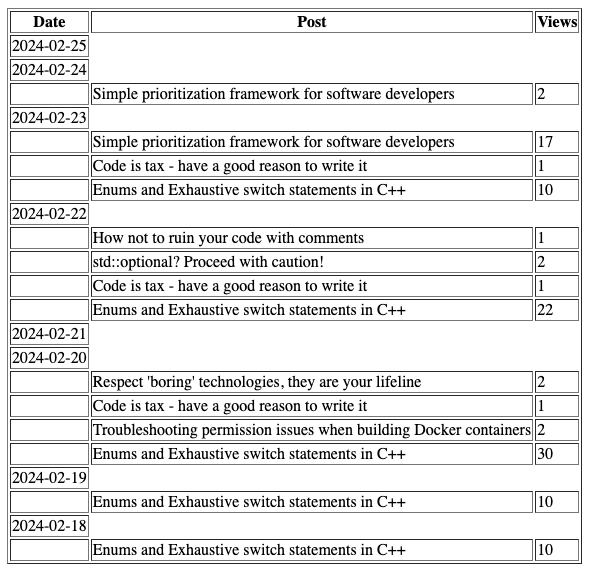
In the last few months, I have published more than a dozen posts on dev.to. Soon after I started, I realized that the analytics provided out-of-the-box was missing some features. One that I have been missing the most is the ability to see a daily breakdown of read posts.

Fortunately, the UI is not the only way to access stats. They are also available via the DEV Community API (Dev.to API). I decided to spend a few hours this weekend to see what it would take to use the Dev.to API to build the feature I was missing the most. I wrote this post to share my learnings.

Project overview

For my project, I decided to build a JavaScript web application with the Express framework and EJS templates. I did this because I wanted a dashboard with some nice-looking graphs. After I started, I realized that building a dashboard would be a waste of time because printing the stats would yield almost the same result (i.e. I could ship without it). In retrospect, my prototype could have been just a command-line application, which would have halved my effort.

DEV Community API crash course

I learned most about what I needed by investigating how the DEV dashboard worked. Using Chrome Developer Tools, I discovered two endpoints that were key to achieving my goal:

  • retrieving a list of articles
  • getting historical stats for a post

Both endpoints require authorization. API authorization mandates setting the api-key header in the HTTP requests. To get your API Key, go to Settings, click on Extensions on the left side, and scroll to the DEV Community API Keys at the bottom of the page. Here, you can see your active keys or generate a new key:

Once you have your API key, you can send API requests using fetch as follows:

function initiateDevToRequest(url, apiKey) {
  return fetch(url, {
    headers: {
      "api-key": apiKey,
    },
  });
}

Retrieving posts

To retrieve a list of published articles, we need to send an HTTP Request to the articles endpoint:

https://dev.to/api/articles/me/published

A successful response is a JSON payload that contains details about published articles, including their IDs and titles.

Side note: there is a version of this API that does not require authorization. You request a list of articles for any user with the following URL: https://dev.to/api/articles?username=moozzyk

Fetching stats

To fetch stats, we need to send a request like this:

https://dev.to/api/analytics/historical?start=2024-02-10&article_id=1769817

The start parameter indicates the start date, while the article_id defines which article we want the stats for.

Productivity tip

You can test APIs requested with the GET method by pasting the URL directly in the browser, as browser authorization does not rely on the api-key header.

<rant>

I found the DEV Community API situation quite confusing. I was pointed to Forem by a web search and initially did not understand the connection between dev.to and Forem. In addition, the Forem’s API page contradicts itself about which API version to use. Finally, it turned out that API documentation does not include the endpoints I use in my project (but hey, they work!).

</rant>

Implementation

Once I figured out the APIs, I concluded that I can implement my idea in three steps:

  • send a request to the articles endpoint to retrieve the list of articles
  • for each article, send a request to the analytics endpoint to fetch the stats
  • group stats by date and show them to the user

Throttling

In my first implementation, I created a fetch request for each article and used Promise.all to send all of them in parallel. I knew it was generally not a brilliant idea because Promise.all does not allow to limit concurrency, but I hoped it would work for my case as I had fewer than 20 articles. I was wrong. With this approach, I only got stats for at most two articles. All other requests were rejected with the 429: Too many requests errors. My requests were throttled even after I changed my code to send one request at a time. To fix this problem, I added delay between requests like this:

  const statResponses = [];
  // Poor man's rate limiting to avoid 429: Too Many Requests
  for (const article of articles) {
    const resp = 
      await initiateArticleStatRequest(article, startDate);
    statResponses.push(resp.ok ? await resp.json() : {});
    await new Promise((resolve) => setTimeout(resolve, 200));
  }

This is not great but works good enough for a handful of articles.

Side note: I noticed that even the UI Dashboard fails to load quite frequently due to throttling

Result

Here is the result – stats for my posts for the past seven days, broken by day:

It is not pretty, but it does have all the information I wanted to get.

Do It Yourself

If you want to learn more about the implementation or just try the project, the code is available on github.

Important: The app reads the API Key from the DEVTO_API_KEY environment variable. You can either set it before starting the app, or configure it in the .env file and start the app with node --env-file=.env index.js

Hopefully you found this useful. If you have any questions drop a comment below.

Code is tax – have a good reason to write it

I once told software engineers on my team: “We’re not here to write code”. They were flabbergasted. But I strongly believe that our job is not to write code but to solve problems. It just so happens that for many problems, code is the best, if not the only solution.

We often get this backwards. We identify as software developers, we love writing code so we will write code whether it is needed or not.

Years of experience taught me to think about a problem before writing a single line of code. I usually try to answer two questions:

  • does this problem need to be solved now or, even at all?
  • can this problem be solved without writing code?

Surprisingly often, this exercise allows me to discover alternative ways of solving a problem that are more effective than writing code.

Not all problems need to be solved

Sometimes, assessing the importance of a problem is difficult, especially when done in isolation. The issue might seem significant, prompting us to solve it with code, only to realize after the fact (or maybe even not) that this work didn’t yield any noticeable improvement.

Consider a service making blocking I/O calls. Such a service won’t scale well. However, if it receives only a few requests per minute rewriting it to improve its throughput won’t have significant impact and is not necessary.

While many such problems will never require further attention, some might need to be revisited. If the service mentioned above needs to be integrated with a system generating many requests per second, fixing the blocking I/O calls could be a top priority. So, it is important to stay on guard and address issues that were initially punted if they resurface again.

Not all problems need to be solved with code

Many problems can be solved without writing any code.

There is an entire class of problems that can be mitigated by changing the configuration of the software. For example, if your streaming service occasionally crashes due to the Out-Of-Memory exception when processing spikes of data, reducing the maximum allowed batch the service fetches for processing could be a perfectly valid solution. Processing the spikes may take a little longer, but the overall processing time may not be affected in a noticeable way and the issue is fixed without changing the code.

Often, you can solve problems making careful design choices. Take user accounts on a website, for example. When deciding how users log in, there are two common options: using their email or letting them create a unique username. Coming up with unique user names can be challenging for applications with millions of users, so many of them suggest an available user name. Using an email as the user name is an elegant way of solving the problem of unique user names without writing any code. It also simplifies the account verification and password recovery flows.

What’s the problem with writing code anyway?

In my perspective, code should be treated like a tax. Just as taxes, once code is added, it is rarely removed. Every person on the team pays this tax day in and day out because each line of code needs maintenance and is a potential source of alerts, bugs or performance issues. This is why I believe that, as software engineers, we should opt for no-code solutions when possible, and write code only when absolutely necessary.