I caused a SEV. Here is what I learned.

About a year ago, I caused the biggest incident (a.k.a. SEV) since the formation of our team. After rolling out my changes, one of the services dropped all the data it received.

Here is what happened and what I learned from it.

Context

Our system is a pipeline of a few streaming services, i.e., the output of one service is the input to the next service in the pipeline. These services process data belonging to different categories. Due to tight timelines, our initial implementation didn’t allow for distinguishing them. While this implementation worked, monitoring, validation, and data analysis were challenging for a few teams. To make the lives of all these teams easier, I decided to implement support for categorization properly.

As my changes weren’t supposed to modify the output of the pipeline, I considered them to be refactoring. Even though I knew this refactoring would be massive and span a few services, I treated it like a side project. I didn’t set any timelines or expectations and worked on it in my free time. As a result, the project dragged on for months because I could only work on it intermittently. The timeline below depicts it:
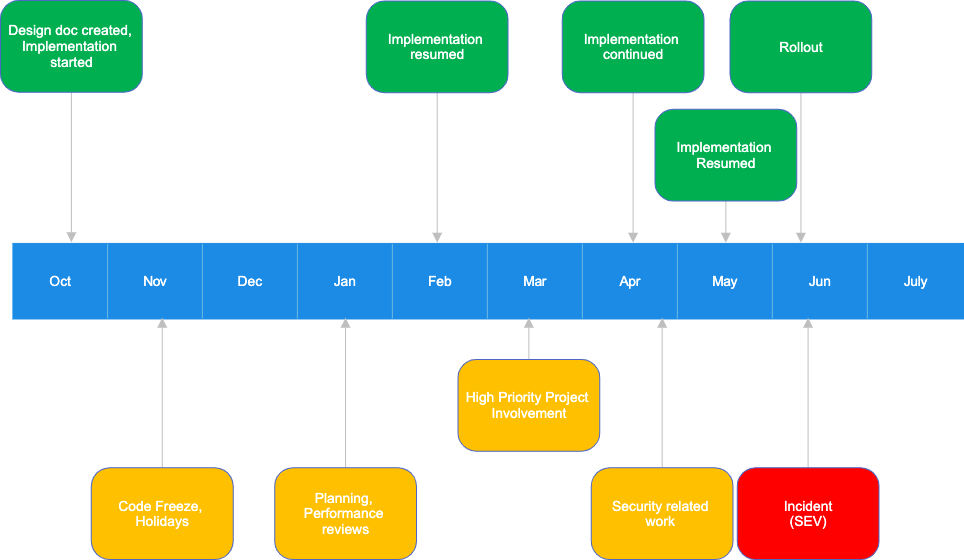
After months of on-and-off work, I finished the implementation in late May and rolled out my changes in early June. A few hours later, alerts indicating missing data went off. My rollout was the primary suspect of the outage, and we quickly confirmed it was indeed the culprit.

Root cause

Our investigation found that the last service in the pipeline had a misconfigured feature flag, which caused the outage. The purpose of this feature flag was to prevent duplicate data from being emitted during validation. It was necessary because, during validation, I sent uncategorized and categorized data sets through the pipeline and compared them. However, the pipeline should only ever output one dataset, so one had to be removed. The easiest way to achieve the correct output during validation was to drop the categorized dataset. The feature flag controlled this behavior.

During the rollout, upstream services started producing only the new, categorized dataset. However, because the feature flag still used the validation setting, the downstream service dropped all data it received.

That’s the technical explanation. But the more interesting question is: why did I forget to configure the feature flag correctly?

I added the feature flag as one of the first implementation steps—almost half a year before the rollout. Because of all the distractions, I forgot that I even touched this service. During the rollout, I again focused only on validating upstream services because, in my mind, these were the only services I modified.

Lessons learned

Every incident is an opportunity to learn something. This one is no different. Here are the two most important lessons I learned from it.

Lesson 1: Avoid taking on tasks I know I can’t properly focus on. Working on and off was very ineffective. Each time I resumed working on my project, I had to spend considerable time remembering where I left off, only to pause again soon after. Instead, I should have worked with my manager to find an engineer who could work on this project without distractions, deliver it faster, and learn from it.

Lesson 2: A reminder always to validate changes end-to-end. In my case, I only focused on services I thought I modified. Had I checked the pipeline output, I would have caught the issue almost immediately.

The end-to-end validation principle applies to any software development work. One example could be unit tests: passing unit tests don’t guarantee that an application works as expected. Quickly loading the application and verifying changes can help catch issues that unit tests didn’t flag. This is important because users care whether the application works, not if unit tests pass.


The paradox of test coverage

When I learn that code owned by a team has low test coverage, I expect “here be dragons.” But I never know what to expect if the code coverage is high. I call this a paradox of high test coverage.

High test coverage does not tell much about the quality of unit tests. Low coverage does.

The low coverage argument is self-explanatory. If tests cover only a small portion of the product code, they cannot prevent bugs in the code that is not covered. The opposite is, however, not true: high test coverage does not guarantee a quality product. How is this possible?

Test issues

While unit tests ensure the quality of the product code, nothing, except the developer, ensures the quality of the unit tests. As a result, tests sometimes have issues that allow bugs to sneak in. Finding unit test issues is more luck than science. It usually happens by accident—usually when tests continue to pass despite code changes that should trigger test failures.

One of the simplest examples of a unit test issue is missing asserts. Tests without asserts are unlikely to flag issues. Other common problems include incorrect setup and bugs caused by copying existing tests and incorrectly adapting them to test a new scenario.

Mocking issues

Mocking allows the code under test to be isolated from its dependencies and simulate the dependency behavior. However, when the simulation is incorrect or the behavior of the dependency changes, tests may happily pass, hiding serious issues.

I’ve been working with C++ code bases, and I often see developers assume, without confirming, that a dependency they use won’t throw an exception. So, when they mock this dependency, they forget about the exception case. Even though their tests cover all the code, an exception in production takes the entire service down.

Uncovered code

Getting to 100% code coverage is usually impractical, if not impossible. As a result, a small amount of code is still not covered. Similar to the low coverage scenarios, any change to the code that is not covered can introduce a bug that won’t be detected.

Chasing the coverage number

Test coverage is only a metric. I’ve seen teams do whatever it takes to achieve the metric goal, especially if it was mandated externally, e.g., at the organization or company level. Occasionally, I encountered teams that wrote “test” code whose primary purpose was increasing coverage. Detecting or preventing bugs was a non-goal.

Low test coverage is only the tip of the iceberg

At first sight, low test coverage seems a benign issue. But it often signals bigger problems the team is facing, like:

  • spending a significant amount of time fixing regressions
  • shipping high-quality new features is slow due to excessive manual validation
  • many bugs reach production and are only caught and reported by users
  • the on-call, if the team has one, is challenging
  • the engineering culture of the team is poor, or the team is under pressure to ship new features at an unsustainable pace
  • the code is not very well organized and might be hard to work with, only slowing down the development even further
  • test coverage is likely lower than admitted to and will continue to deteriorate

I’ve worked on a few teams where developers understood the value of unit testing. They treated test code like product code and never sent a PR without unit tests. Because of this, even if they experienced the problems listed above, it was at a much smaller scale. They also never needed to worry about meeting the test coverage goals – they achieved them as a side effect.

Top 5 Unit Test Problems That Haunt Software Developers

Well-written unit tests are one of the most effective tools for ensuring product quality. Unfortunately, not all unit tests are well written, and the ones that are not are often a source of frustration and lost productivity. Here are the most common unit test issues I encountered during my career.

Flaky unit tests

Flaky tests pass most of the time, but not always. They may randomly fail even though no code has changed. The quickest and most common “fix” developers employ is to re-run them. With time, the number of flaky tests grows, and even multiple re-runs are insufficient.

Flaky tests are caused primarily by the following:

  • shared state
  • dependency on external systems

A shared state is the number one cause of test flakiness. Static variables could be one example. If one test sets a static variable and another passes only if this variable is set, the second test will fail if the order of execution changes.

Debugging flakiness caused by shared state is usually tricky because sharing state is rarely intentional.

Tests that depend on external systems tend to be flaky because the systems they rely on are outside their control. Any deployments, crashes, or throttling will cause test failures. Network, which is inherently unreliable, is yet another contributor. The best fix is to mock external dependencies.

Multithreaded applications deserve special mention. Race conditions in the product code could make tests for these applications flaky, and finding the root cause is often challenging.

Slow tests

Slow tests are a productivity killer. If running tests for a code change takes more than a few seconds, developers will use it as an excuse to find a distraction.

One of the most common reasons tests are slow is their dependency on external systems: network calls and the time to process the requests initiated by tests add up.

But tests that depend on external systems are also flaky, so slowness and flakiness go hand-in-hand.

Again, mocking external dependencies is the best fix to make tests fast and reliable.

If relying on external systems is intentional (e.g., end-to-end testing), it is worth separating end-to-end tests into a dedicated suite executed separately, for instance, as part of the nightly build.

I was once on a team where running all the tests took more than two hours because most of them communicated with a database. These tests were also flaky, so merging more than one Pull Request a day was virtually impossible.

Bugs in unit tests

Tests are there to ensure the quality of the product, but nothing is there to ensure the quality of tests. As a result, tests may fail to do their job due to bugs. Unfortunately, identifying these bugs is not easy. Paying attention can help. For instance, if all tests continue to pass after changing the product code, it usually indicates either bugs in tests or missing test coverage.

Hard to maintain tests

Tying tests and implementation details closely usually causes numerous test failures after even simple product code changes. Keeping tests focused on functionality instead of on the implementation can significantly reduce the number of unnecessary test failures.

Writing “tests” only to hit the code coverage number

Test code written solely to meet code coverage goals is usually low quality. Assertions in such code are often missing because they don’t contribute to the coverage goal but can cause failures. Test coverage reported by tools can make the manager look good, but this test code is useless as it can’t prevent bugs. What’s worse, the high coverage hides areas that do need attention.

This is my list of the top 5 unit test issues. What’s yours?

Do Unit Tests Find Bugs?

I’ve been writing software for over 20 years and don’t believe unit tests find bugs.

Yet, I wouldn’t want to work in a code base without unit tests.

Why unit tests don’t find bugs?

To understand why unit tests don’t find bugs, we can look at how they are created. Here are the three main ways to handle unit tests:

  • developers write the tests along with writing the code
  • Test Driven Development (TDD)
  • unit tests are considered a waste of time, so they don’t exist

When the same software developer writes unit tests and code simultaneously, the tests tend to reflect closely what the code does. Both tests and code follow the same logic, stemming from the same understanding of the problem. As a result, the tests won’t find major implementation issues. If they find small typos or bugs, it’s usually only by chance.

Test-driven development calls for writing unit tests before implementing product changes. Because no product code exists, the unit tests are expected to fail initially or even not compile. The goal is to write product code to make the tests pass. In TDD, new unit tests are added mostly to drive the implementation of new scenarios. An unsupported scenario could be considered a bug, but it’s far-fetched. As a result, TDD rarely finds existing bugs.  

If unit tests don’t exist, they cannot find any bugs.

If unit tests don’t find bugs, why do we write them?

While unit tests are not great at finding bugs, they are extremely effective at preventing new ones. Unit tests pin the program’s behavior. Any change that visibly modifies this behavior should make the tests fail. The developer whose changes caused the failures should examine them and either fix the tests—if the change in the behavior was intentional—or fix the code. Many test failures indicate assumptions that the developer unknowingly broke. Without tests, they would turn into customer-impacting bugs.

Other important advantages of unit tests include:

  • Documentation – comprehensive unit tests can serve as product specification
  • More modular and maintainable code – writing unit tests for tightly coupled code is difficult. Unit tests drive writing more modular and loosely coupled code because it is much easier to test.
  • Automated testing – unit tests are much faster to run and more comprehensive than testing changes manually.

If unit tests don’t find bugs, what does?

There are many ways to find bugs in the code. Integration testing, fuzz testing, and stress testing are just some examples. However, the three below are my favorite because they require little to no additional effort from the developers:

  • Exploratory testing: Try using the product you’re working on. See what happens if you combine a few features or try less common scenarios.
  • Code reviews: One weakness of unit tests is that they are implemented with the same perspective as the code. Code reviews offer the ability to look at the change from a different angle, which often leads to discovering issues.
  • Paying attention: Whenever you code, debug, or troubleshoot an issue, have your eyes open. Many bugs are hiding in plain sight. Carefully reading error messages, logs, or stack traces can lead to identifying serious problems.

Use Test Plans to become a more effective Software Developer

Shipping high-quality software is the responsibility of each software developer. Not only are the days when handing untested code to the QA team for validation a common practice long gone, but many companies have also moved away from QA-based testing, making developers fully own the quality of the product. This creates a problem: how can you ensure developers do their due diligence and validate their changes? At Meta (a.k.a. Facebook), we use “test plans.”

What are test plans?

Test plans describe how authors tested their changes. They are an integral part of Meta’s code review process: the code review tool does not allow submitting code for review if the test plan is empty.

While it is common for test plans to say: “unit tests,” many are much more interesting and often include:

  • screenshots showing the UI before and after the change
  • videos showing the change in action
  • API requests and corresponding responses (e.g., JSON payloads)
  • dashboard snapshots from canary runs
  • terminal printouts
  • Funny memes – especially if the testing was not comprehensive or applicable (e.g., auto-generated code, changes to unit tests only, etc.)

Benefits of requiring Test Plans in commits

The most obvious benefit of requiring test plans is forcing developers to think about validating their changes. While not all test plans are comprehensive, most are decent.

Occasionally, test plans reveal that the code change does not work as the author intended. I once proudly included a graph hovering a little below 100% as my test plan, only for a reviewer to point out that my graph represented not the success rate, as I claimed, but the error rate.

However, one often overlooked benefit of requiring test plans is that they can be lifesavers when working with unfamiliar code.

Imagine you are tasked with building a new feature in a mobile app. While working on the feature, you discover that the API powering your app doesn’t return all the necessary information. You can ask the API team to add it, but they may not be able to accommodate your request on short notice. Perhaps it would be faster if you implemented this change yourself. The only problem is that you are not familiar with the backend code. You don’t know how to test it to ensure you didn’t break anything. In these situations, test plans can come in extremely handy. You can check the commit history of the code you want to change and see how developers who regularly contribute to it test it. In addition, checking past test plans may help you discover edge cases you need to consider. I successfully used this strategy multiple times to change an unfamiliar codebase I would otherwise be afraid to touch.

“My unit test coverage is 100%”

Test plans should not be considered a replacement for unit tests. As great as unit testing is, it is not always sufficient. Additional end-to-end validation helps confirm that the changes worked as intended outside of the isolation provided by unit tests and that they didn’t introduce unwanted behavior. I have seen (and caused) situations where my application wouldn’t start even though all unit tests were passing.

Call To Action

Including test plans in pull requests is not a common practice, let alone a requirement, in most companies or teams. Despite that, I encourage you to follow this practice. Your team members will notice it and may start doing the same if they find it useful. And even if they don’t, you will still benefit from this habit. Going the extra mile can help you find issues before they impact users. With time, it will get easier because you can reuse past test plans to validate some of your current changes. You may need to tweak them a little, but you won’t have to start from scratch each time.