Hacking Linq to Entities with Expressions Part 1: Clean Generic Repository

The repository pattern is intended to create an abstraction layer between the data access layer and the business logic layer of an application and is often used with Entity Framework. To avoid creating repository classes specific to each entity type it is a common practice to create a generic repository class that can be used for any entity. However, most examples I have seen could not really be used easily for any entity. For instance the repository type requires to provide a generic type for the key (e.g. class Repository<TEntity, TKey>) which should not really be required as the type of the entity is provided. Another thing to look at it is the GetById() method. It’s interesting at least for a couple of reasons:

  • key properties of different entity types may have different types (e.g. string key properties vs. int key properties)
  • key properties of different entity types may have different names

I have seen several ways of solving the above problems, for instance: enforcing all entities to be derived from a base (possibly generic) entity type containing the key property (it does not solve the problem of entity types with different key property names since the names of all key properties in the whole model will be the same) or passing a lambda expression/query to the GetById() method (feels wrong to me since the GetById() method should just take the value of the key for which to return the entity and not query, property name and whatnot). I thought a little bit on this I concluded that it should be possible to create a generic repository type without any additional overhead since we already have all the information that is needed. We know the entity type – it is the generic parameter to the repository type. We are able to reason about the entity type (i.e. figure out what the key property are) because we do have the context and – as a result – we can access all the metadata. Finally – for the GetById() we have the value of the key since it is provided by the user. The only obstacle here is to create the right query to send to the database but this can be easily solved by creating the query dynamically with Expression Trees.
** EDIT **
As pointed out by Florim below in the comments there is a better option than building a dynamic query – namely DbSet.Find() method. Not it is simpler (it does not require building the dynamic query) but also it may save a trip to the database if the entity is available locally. I am leaving the rest of the post as is to justify the “Hacking Linq to Entities with Expressions” title.
** EDIT END **
Let’s start from finding the key property – given the entity type TEntity (the generic entity type of the repository) and a valid DbContext (derived) instance (passed as a parameter to the constructor of the repository type) we can find the key property as follows:

private PropertyInfo GetKeyProperty(DbContext context)
{
    if (_keyProperty == null)
    {
        var edmEntityType = 
            ((IObjectContextAdapter)context)
                .ObjectContext
                .MetadataWorkspace
                .GetItems<EntityType>(DataSpace.CSpace)
                .Single(e => e.Name == typeof(TEntity).Name);

        _keyProperty = 
            typeof(TEntity)
                .GetProperty(
                    edmEntityType.KeyMembers.Single().Name, 
                    BindingFlags.Instance | BindingFlags.Public | BindingFlags.NonPublic);

        if (_keyProperty == null)
        {
            throw new InvalidOperationException("Key property not found.");
        }
    }

    return _keyProperty;
}

Building the filter (i.e. the e => e.{keyProperty} == value) using Expression Trees is just a few lines of code:

private IQueryable<TEntity> Filter<TKey>(
    IQueryable<TEntity> dbSet,
    PropertyInfo keyProperty,
    TKey value)
{
    var entityParameter = Expression.Parameter(typeof(TEntity), "e");

    var lambda =
        Expression.Lambda<Func<TEntity, bool>>(
            Expression.Equal(
                Expression.Property(entityParameter, keyProperty),
                // no cast required if the passed value is of the 
                // same type as the key property
                typeof(TKey) == keyProperty.PropertyType ?
                    (Expression)Expression.Constant(value) :
                    (Expression)Expression.Convert(
                        Expression.Constant(value), keyProperty.PropertyType)),
                entityParameter);

    return dbSet.Where(lambda);
}

And finally we will connect the dots and create the GetById() method:

public TEntity GetById<TKey>(TKey value)
{
    return Filter(
        _context.Set<TEntity>(),
        GetKeyProperty(_context), value).SingleOrDefault();
}

Yes, the GetById() is generic. This is to avoid the value to be of the object type. Note that this does not add any overhead since the generic type does not have to be provided when invoking this method – the compiler is able to infer the type from the value of the parameter. In addition the Filter method will add a cast if the type of the passed value is different from the type of the key property (which will result in an exception at runtime if the provided value cannot be cast to the type of the key property).
For completeness here is the generic repository class (it does not include the Add, Delete etc. methods as they are not as interesting to me as the GetById() method):

public class Repository<TEntity> where TEntity : class
{
    private readonly DbContext _context;

    // for brevity composite keys are not supported
    private PropertyInfo _keyProperty;

    public Repository(DbContext context)
    {
        _context = context;
    }

    public TEntity GetById<TKey>(TKey value)
    {
        return Filter(
            _context.Set<TEntity>(),
            GetKeyProperty(_context), value).SingleOrDefault();
    }

    private IQueryable<TEntity> Filter<TKey>(
        IQueryable<TEntity> dbSet,
        PropertyInfo keyProperty,
        TKey value)
    {
        var entityParameter = Expression.Parameter(typeof(TEntity), "e");

        var lambda =
            Expression.Lambda<Func<TEntity, bool>>(
                Expression.Equal(
                    Expression.Property(entityParameter, keyProperty),
                    // no cast required if the passed value is of the
                    // same type as the key property
                    typeof(TKey) == keyProperty.PropertyType ?
                        (Expression)Expression.Constant(value) :
                        (Expression)Expression.Convert(
                            Expression.Constant(value), keyProperty.PropertyType)),
                    entityParameter);

        return dbSet.Where(lambda);
    }

    private PropertyInfo GetKeyProperty(DbContext context)
    {
        if (_keyProperty == null)
        {
            var edmEntityType =
                ((IObjectContextAdapter)context)
                    .ObjectContext
                    .MetadataWorkspace
                    .GetItems<EntityType>(DataSpace.CSpace)
                    .Single(e => e.Name == typeof(TEntity).Name);

            _keyProperty =
                typeof(TEntity)
                    .GetProperty(
                        edmEntityType.KeyMembers.Single().Name,
                        BindingFlags.Instance | BindingFlags.Public | BindingFlags.NonPublic);

            if (_keyProperty == null)
            {
                throw new InvalidOperationException("Key property not found.");
            }
        }

        return _keyProperty;
    }

    // other "less interesting" methods
}

… and an example of how to use it. For the following, simple model with entities having keys with different names and of different types:

public class Customer
{
    public string CustomerId { get; set; }
    
    // ...
}

public class Order
{
    public Guid OrderId { get; set; }

    // ...
}

public class Item
{
    public int ItemId { get; set; }

    // ...
}

public class Context : DbContext
{
    public DbSet<Customer> Customers { get; set; }
    public DbSet<Order> Orders { get; set; }
    public DbSet<Item> Items { get; set; }
}

The entities can be retrieved by id as simple as:

using (var ctx = new Context())
{
    Console.WriteLine(
        new Repository<Customer>(ctx)
            .GetById("ALFKI").CustomerId);

    Console.WriteLine(
        new Repository<Order>(ctx)
            .GetById(new Guid("00000000-0000-0000-C000-000000000046")).OrderId);

    Console.WriteLine(
        new Repository<Item>(ctx)
            .GetById((byte)1).ItemId);
}

As you can see the code is clean – no extraneous information is provided – just the type of the entity and the value of the key (Yeah, the cast to byte is not needed – it is just to test that the logic in the dynamically built filter works)
Entity Framework 6 and Model/Database First Work Flows

Visual Studio 2012 (out-of-band release) and Visual Studio 2013 (in-box) now support Model/Database workflows for EF6. See this post for more details.

Entity Framework 6 Alpha 2 has shipped. It has some new cool features (like custom conventions or automatic discovery of entity configurations) and a few other improvements (like improved queries for Linq Enumerable.Contains or changing the default isolation level when creating a SqlServer new database with CodeFirst). Most of the new features and many improvements are CodeFirst related or CodeFirst only. Still there are people who would prefer using a designer to draw a model and create the database or create a model from an existing database and tweak it. The latest version of the Entity Framework Designer which shipped in VS2012 supports only EF5 so it does not seem like it could handle EF6. However after seeing a question on the Entity Framework team blog a couple days ago I thought it would be interesting to really see if this is the case and what it would take to be able to actually use ModelFirst and DatabaseFirst work flows with EF6. In general I thought it might be possible – artifacts have not changed since EF5. As well as most APIs. The two fundamental changes to EF6 are changes to the provider model and all the “new” types that previously lived in System.Data.Entity.dll. New provider model should not be a big concern here – we care about the results here and not about how they are achieved. So, as long as the designer is able to create the database correctly (model first approach) or the edmx file from the database (database first approach) EF6 runtime should be able to use those. Changes to types seemed more worrisome – not only types themselves changed and have new identities but in many cases namespaces changed as well. Luckily the designer now uses T4 templates to generate the code from the edmx file so it is just a pure textual transformation. I expected that I would need to change the T4 templates a bit to make the code compile with EF6 but it should be easy. After all this mental work-out I decided to try it out. I opened VS 2012, created a new project, added a new ADO.NET Entity Framework model, removed references to System.Data.Entity.dll and EntityFramework.dll (5.0.0.0) and added a reference to the EF6 Alpha2 package using NuGet. Then I created a model from an existing database. The project compiled without errors. I added a few lines of code to bring some entities from the database and everything worked. Adding new entities worked as well. Finally I deleted my model and created a new model to try the Model First approach. Similarly I had to remove references to System.Data.Entity.dll and EntityFramework.dll (5.0.0.0) but other than that everything just worked. While what I did was not a very comprehensive test and using VS2012 for EF6 projects is in general not supported I am pretty confident it will work and should be sufficient until a version of the designer that supports EF6 ships.
(Yes, I am a bit disappointed with how easy it was. I hoped this would be a report from a battlefield where I was able to achieve my goal by using a hack here or adding a few lines of code there and maybe even producing a VSIX as a side effect. On the other hand I am happy that even though the post is a little boring the experience for users is much nicer. This is more important).

Entity Framework 6 and pre-generated views

The version for EF6 RTM is now available.

(If you are interested in pre-generated views in EF6 take also a look at this .)

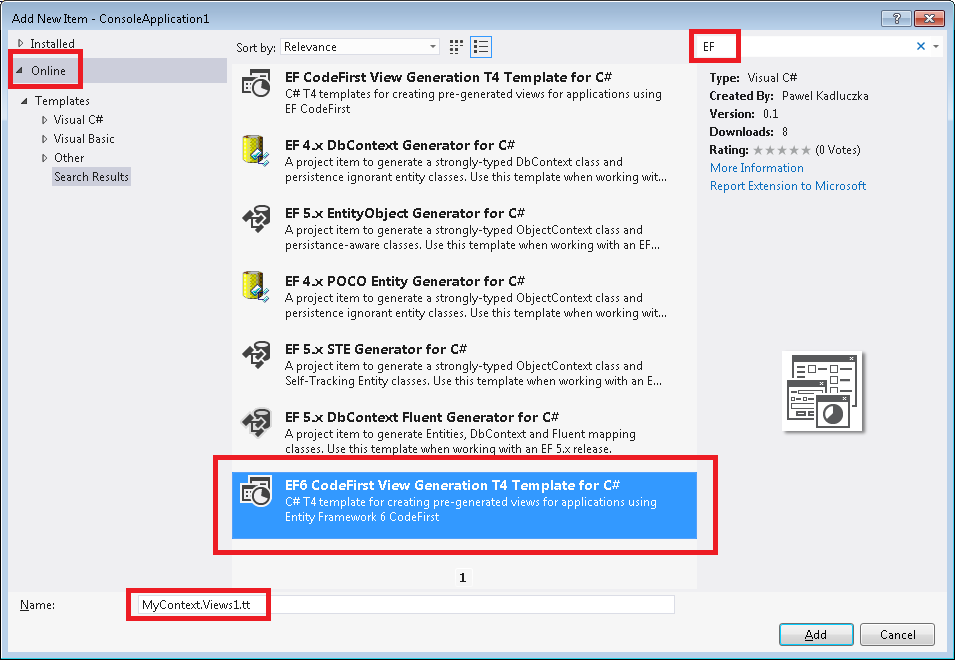
Entity Framework 6 is here. Even though it is in a very early stage it already looks exciting – a lot of improvements in Migrations (multi-tenant migrations, migrations history table customizations), Async, DI for resolving dependencies, code based configuration. Most of it (including features shipped in EF5 – e.g. enums) is running on both .NET Framework 4 and .NET Framework 4.5. In addition trying all of this is as simple as 1, 2, 3 – signed nightly builds are available on a nuget feed. We also take contributions and are thankful to everyone who has already contributed. There is one thing in EF6 that is missing however – the ability to create pre-generated views. I would love it to stay this way but unfortunately views are still one of the problematic areas in EF6. We see some promising activities around views and I hope this will help resolve or at least relieve the problem but for now the solution is still to pre-generate views. So, how do you pre-generate views in EF6? In the previous versions of EF you would either use EdmGen or EF Power Tools. Heck, you could even use my T4 templates. The problem is that all these tools are using System.Data.Entity.Design.dll to generate views and this code was not open sourced. Also, the code generated by System.Data.Entity.Design.dll will not work (without modifications) for EF6. So, it seems it is not possible to pre-generate views on EF6 then… But wait, EF6 is open source isn’t it? Why not make the code that is needed to create views public to enable view generation? It’s one option but there is also a second option – hack the system. While I strongly believe the first option is the right thing to do in the long run for now I went with the second option. There is one main reason for this – making some random functions public to make stuff work is less then ideal. It would be much better to add a nice(r), small API for view generation that could be used by tools that need to generate views. Therefore I decided to create a T4 template for generating views which, at the moment, is using reflection to get what it needs. I treat it just as a prototype (that’s one of the reasons why only C# version exists at the moment) and I hope it will help me define the right API for view generation. When I get to this point I will be able to remove the reflection hacks and just use the API. There is one more thing about the template itself. Since it is not possible to use System.Data.Entity.Design.dll the code needs to be generated by the template itself. It’s a bit more work but allows for much more flexibility. For instance, view generators based on System.Data.Entity.Design.dll were prone to the “No logical space left to create more user strings” error caused by the number of strings in the generated code that could be so big that it reached the .NET metadata format limit on the number of user string characters. This error would prevent an application from starting. This problem is now solved – the template creates an xml file that contains actual view definitions and saves this file in the assembly as an embedded resource. When the EF stack requests views the code generated by the template loads views from the embedded xml file. Using the template is not much different from using the templates for EF5 as it is too published on Visual Studio Code Gallery. First, if you have not already, setup the nuget feed containing EF6 assemblies. Create a new project and add the EF6 nuget package (make sure to select “Include Prelease” in the dropdown at the top of the window) from the feed you created. Now you can start writing your app. Once you have something that compiles right-click on your project and select Add→New Item (Ctrl+Shift+A). In the “Add New Item” window select “Online” on the left. You may want to filter by EF or EF6. Select the “EF6 CodeFirst View Generation T4 Template for C#”. Change the name of the .tt file so that it starts with the name of your context and press the “Add” button:

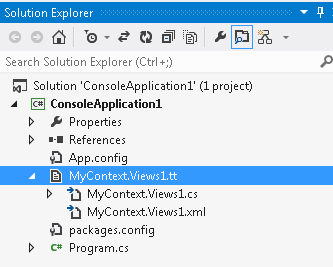
Once it’s done you should see the template and two new files added to your project – one of the files is the embedded xml resource file containing views and the second is the C# files used to load views from the first file:

If you need to uninstall the templates go to Tools→Extensions and Updates… select the template from the list and click the “Uninstall” button.

That’s it for now. Use EF6, enjoy the template and report bugs for both…

Entity Framework Code First View Generation Templates Updated

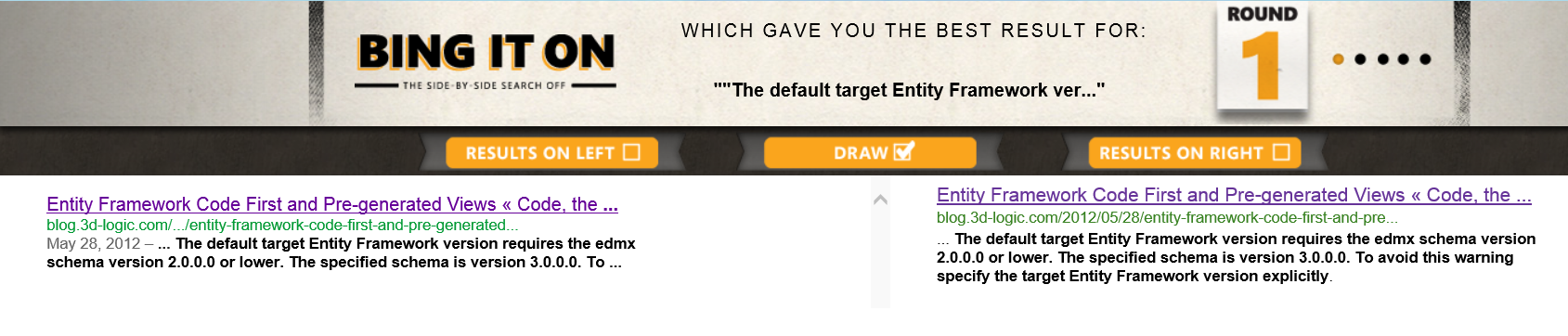
Everyone fights to be on the first page of the Google search results. But sometimes it’s not cool. One of the cases when it’s not cool is when you introduce a bug that causes a link to your blog to pop up on the first page of the Google search results. Can it be worse? How about the link to your blog being not only on the first page of the Google search results but also *the only* link on the Google search results. Can it be even worse? How about the only result not only in Google but in Bing as well (Hey http://bingiton.com, it’s a tie: ). Sure, it will add some traffic to your blog but it’s a bad kind of traffic. Desperate people looking for a solution to a problem that seemingly can be solved by only one guy on this planet. Now, I feel unique. Unfortunately in a bad sense. Why? Because a bug that was in T4 templates for generating views for CodeFirst apps made all the above a true story. When the templates were used on Visual Studio 2012 the user would get the an exception saying: “The default target Entity Framework version requires the edmx schema version 2.0.0.0 or lower. The specified schema is version 3.0.0.0. To avoid this warning specify the target Entity Framework version explicitly.” (now Google and Bing should show two results 😉 ). I noticed this the first time when I wanted to show the integration of Visual Studio and Visual Studio Gallery to my sister. Then it was reported by a reader as a comment to the first post on view generation and code first I wrote some time ago. Then I saw it more and more often in search engine terms in the stats of this blog. Today I finally found some time to fix the bug and update the templates to the Visual Studio Gallery. I tested the fix on Visual Studio 2012 (C# and VB.NET projects, both targeting .NET Framework 4.5 and .NET Framework 4) and on Visual Studio 2010 (C# and VB.NET project, targeting .NET Framework 4) and did not get the exception anymore. The new templates have version 1.0.1. If you installed version 1.0.0 you probably need to uninstall the old templates (Tools → Extensions and Updates) and install new ones. I have not tried installing new templates without uninstalling old ones – it may or may not work. If you hit any new problems let me know.

Using exisiting enum types in Entity Framework 5

When we first showed long awaited support for enum types in the Microsoft Entity Framework June 2011 CTP (which you should not be using) we received a lot of feedback. One of the areas we got lots of comments in were restrictions around mapping O-Space (i.e. CLR) enum types to C-Space (i.e. EDM) enum types. The requirements were that the full name of the C-Space enum type must match the full name of the O-Space enum type and that enum members of both types had to be an exact match. These two rules basically prevented from using already existing enum types. While I think that in most EF scenarios people will use enum types they create rather than re-use existing enum types, there was really no reason to block scenarios where existing enum types were being used. So, we went ahead and relaxed the above rules. Firstly, when trying to match enum types we only compare type name and ignore namespaces. Secondly, members are no longer required to match exactly but any member on the EDM enum type must have a counterpart in the CLR enum type (note that this is unidirectional i.e. members from the CLR enum type don’t have to exist in the EDM enum type). The latter effectively allows an EDM enum type that has no member whatsoever to be mapped to a CLR enum type that has some members (* – disclaimer: see at the bottom). After introducing the changes using existing enum types became easy. When using CodeFirst approach the entity will just have a property of the desired enum type e.g.:

    public class MyEntity
    {
        public int Id { get; set; }
        public System.DayOfWeek Day { get; set; }
    }

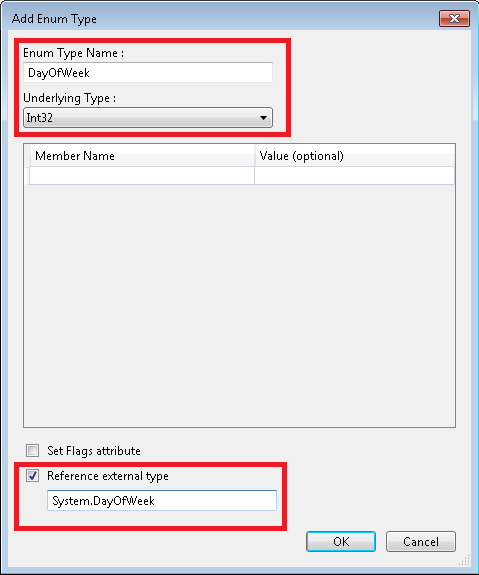
That’s it – it should “just work”. But what about ModelFirst or DatabaseFirst? When you look at the “Add Enum Type” dialog:

Add Enum Type Dialog

you will see the “Reference External Type” checkbox at the bottom. If you want to use an existing enum type just check this checkbox and enter the fully qualified name of the enum type in the box below the checkbox. Remember that the name of the enum type being created (“Enum Type Name” box) must match the name of the CLR enum type. Underlying types must also match. If you now close the dialog and look at the EDMX (you need to open the .edmx file with Xml Editor) you will see the following enum type definition (I copied the namespace definition to make the xml fragment valid):

<EnumType Name="DayOfWeek" cg:ExternalTypeName="System.DayOfWeek" xmlns:cg="http://schemas.microsoft.com/ado/2006/04/codegeneration" />

The interesting fact about the definition above is that the type has no members (we don’t need them). But the {http://schemas.microsoft.com/ado/2006/04/codegeneration}ExternalTypeName attribute is even more interesting – it contains the name of the CLR type we entered when adding a new enum type to the model. As the namespace uri indicates this attribute is used by code generation. When the code is generated whenever the enum type is referenced the templates will use the value from the {http://schemas.microsoft.com/ado/2006/04/codegeneration}ExternalTypeName attribute rather than the value from the Name attribute. Here is the result:


//------------------------------------------------------------------------------
// <auto-generated>
//    This code was generated from a template.
//
//    Manual changes to this file may cause unexpected behavior in your application.
//    Manual changes to this file will be overwritten if the code is regenerated.
// </auto-generated>
//------------------------------------------------------------------------------

namespace ConsoleApplication1
{
    using System;
    using System.Collections.Generic;
    
    public partial class MyEntity
    {
        public int Id { get; set; }
        public System.DayOfWeek Day { get; set; }
    }
}

To make it clear – the {http://schemas.microsoft.com/ado/2006/04/codegeneration}ExternalTypeName attribute is not used at runtime. It exists purely to support code generation. Another caveat is that the attribute works only in DbContext based templates – which are the default code generators in EF5 and Visual Studio 2012.
Using existing enum types in Entity Framework 5 should be now easy!

* – as reported by Paweł Madurski on stackoverflow there is a bug where EF still checks for enum members when using Contains with an array of enum values (or to be more precise where a query requires creating the DbConstantExpression instance an enum value). This is tracked on Entity Framework codeplex page: http://entityframework.codeplex.com/workitem/623