C++ Async Development (not only for) for C# Developers Part I: Lambda Functions

And now for something completely different…

I was recently tasked with implementing the SignalR C++ client. The beginnings were (are?) harder than I had imagined. I did some C++ development in late nineties and early 2000s (yes I am that old) but either I have forgotten almost everything since then or I had never really understood some of the C++ concepts (not sure which is worse). In any case the C++ landscape has changed dramatically in the last 15 or so years. Writing tests is a common practice, standard library became really “standard” and C++ 11 is now available. There is also a great variety of third party libraries making the life of a C++ developer much easier. One of such libraries is cpprestsdk codename Casablanca. Casablanca is a native, cross platform and open source library for asynchronous client-server communication. It contains a complete HTTP stack (client/server) with support for WebSockets and OAuth, support for JSon and provides APIs for scheduling and running tasks asynchronously – similar to what is offered by C# async. As such cpprestsdk is a perfect fit for a native SignalR client where the client communicates over HTTP using JSon and takes the full advantage of asynchrony.
I am currently a couple of months into my quest and I would like to share the knowledge about C++ asynchronous development with the cpprestsdk I have gained so far. My background is mostly C# and it took me some time to wrap my head around native async programming even though C# async programming is somewhat similar to C++ async programming (with cpprestsdk). Two things I wish I had had when I started were to know how to translate patterns used in C# async programming to C++ and what the most common pitfalls are. In this blog series I would like to close this gap. Even though some of the posts will talk about C# quite a lot I hope the posts will be useful not only for C# programmers but also for anyone interested in async C++ programming with cpprestsdk.

Preamble done – let’s get started.

Cpprestsdk relies heavily on C++ 11 – especially on newly introduced lambda functions. Therefore before doing any actual asynchronous programming we need to take a look at and understand C++ lambda functions especially that they are a bit different (and in some ways more powerful) than .NET lambda expressions.
The simplest C++ lambda function looks as follows:

auto l = [](){};

It does not take any parameter, does not return any value and does not have any body so doesn’t do anything. A C# equivalent would look like this:

Action l = () => {};

The different kinds of brackets one next to each other in the C++ lambda function may seem a bit peculiar (I saw some pretty heated comments from long time C++ users how they feel about this syntax) but they do make sense. Let’s take a look what they are and how they are used.

[]
Square brackets are used to define what variables should be captured in the closure and how they should be captured. You can capture zero (as in the example above) or more variables. If you want to capture more than one variable you provide a comma separated list of variables. Note that each variable can be specified only once. In general you can capture any variable you can access in the scope and – except for the this pointer – they can be captured either by reference or by value. When a variable is captured by reference you access the actual variable from the lambda function body. If a variable is captured by value the compiler creates a copy of the variable for you and this is what you access in your lambda. The this pointer is always captured by value. To capture a variable by value you just provide the variable name inside the square brackets. To capture a variable by reference you prepend the variable name with &. You can also capture variables implicitly – i.e. without enumerating variables you want to capture – letting the compiler figure what variables to capture by inspecting what variables are being used in the lambda function. You still need to tell how you want to capture the variables though. To capture variables implicitly by value you use =. To capture variables implicitly by reference you use &. What you specify will be the default way of capturing variables which you can refine if you need to capture a particular variable differently. You do that just by adding the variable to the capture list. One small wrinkle when specifying variables explicitly in the capture list is that if the variable is not being used in the lambda you will not get any notification or warning. I assume that the compiler just get rids of this variable (especially in optimized builds) but still it would be nice to have an indication if this happens. Here are some examples of capture lists with short explanations:

[] // no variables captured
[x, &y] // x captured by value, y captured by reference
[=] // variables in scope captured implicitly by value
[&] // variables in scope captured implicitly by reference
[=, &x] // variables in scope captured implicitly by value except for x which is captured by reference
[&, x] // variables in scope captured implicitly by reference except for x which is captured by value

[=, &] // wrong – variables can be captured either by value or by reference but not both
[=, x] // wrong – x is already implicitly captured by value
[&, &x] // wrong – x is already implicitly captured by reference
[x, &x] // wrong – x cannot be captured by reference and by value at the same time

How does this compare to C# lambda expressions? In C# all variables are implicitly captured by reference (so it is an equivalent of [&] used in C++ lambda functions) and you have no way of changing it. You can work around it by assigning the variable you want to capture to a local variable and capture the local variable. As long as you don’t modify the local variable (e.g. you could create an artificial scope just for declaring the variable and defining the lambda expression – since the variable would not be visible out of scope it could not be modified) you would get something similar to capturing by mutable value. This was actually a way to work around a usability issue where sometimes if you closed over a loop variable you would get unexpected results (if you are using Re# you have probably seen the warning reading “Access to foreach variable in closure. May have different behaviour when compiled with different versions of compiler.” – this is it). You can read more about this here (btw. the behavior was changed in C# 5.0 and the results are now what most developers actually expect).

()
Parenthesis are used to define a formal parameter list. There is nothing particularly fancy – you need to follow the same rules as when you define parameters for regular functions.

Return type
The simplest possible lambda I showed above did not have this but sometimes you may need to declare the return type of the lambda function. In simple cases you don’t have to and the compiler should be able to deduce the return type for you based on what your function returns. However, in more complicated cases – e.g. your lambda function has multiple return statements – you will need to specify the return type explicitly. A lambda with an explicitly defined return type of int looks like this:

auto l = []()->int { return 42;};

mutable
Again something that was not needed for the “simplest possible C++ lambda” example but I think you will encounter it relatively quickly when you start capturing variables by value. By default all C++ lambda functions are const. This means that you can access variables captured by value but you cannot modify them. You also cannot call non-const functions on variables captured by value. Prepending lambda body with the mutable keyword makes the above possible. You need to be careful though because this can get tricky. For instance what you think the following function prints?

void lambda_by_value()
{
    auto x = 42;
    auto l = [x]()
    mutable {
        x++;
        std::cout << x << std::endl;
    };

    std::cout << x << std::endl;
    l();
    l();
    std::cout << x << std::endl;
}

If you guessed:

42
43
44
42

– congratulations – you were right and you can skip the next paragraph; otherwise read on.
Imagine your lambda was compiled to the following class (disclaimer: this is my mental model and things probably work a little bit differently and are far more complicated than this but I believe that this is what actually happens at the high level):

class lambda
{
public:
    lambda(int x) : x(x)
    {}

    void operator()()
    {
        x++;
        std::cout << x << std::endl;
    }

private:
    int x;
};

Since we capture x by value the ctor creates a copy of the passed parameter and stores it in the class variable called x. Overloading the function call operator (i.e. operator()) makes the object callable making it similar to a function but the object still can maintain the state which is perfect in our case because we need to be able to access the x variable. Note that the body of the operator() function is the same as the body of the lambda function above. Now let’s create a counterpart of the lambda_by_value() function:

void lambda_by_value_counterpart()
{
    auto x = 42;
    auto l = lambda(x);
    std::cout << x << std::endl;
    l();
    l();
    std::cout << x << std::endl;
}

As you can see the lambda_by_value_counterpart() function not only looks almost the same as the original lambda_by_value() (except that instead of defining the lambda inline we create the lambda class) but it also prints the same result. This shows that when you define a lambda the compiler creates a structure for you that maintains the state and is used across lambda calls. Now also the mutable keyword should make more sense. If, in our lambda class the operator() function was actually const we would have not been able to modify the class variable x. So the function must not be const or the class variable x must be defined as (surprise!)… mutable int x;. (In the example I decided to make the function operator() non-const since it feels more correct).

auto vs. var
Since C++ lambda definitions contain full type specifications for parameters and the return type you can use auto and leave it to the compiler to deduce the type of the lambda variable. In fact I don’t even know how to write the type of the lambda variable explicitly (when I hover over the auto in Visual Studio it shows something like class lambda []void () mutable->void but this cannot be used as the type of the variable). In C# you cannot assign a lambda expression to var for several reasons. You can read up why here.

That’s more or less what I have learned about C++ lambda functions in the past few weeks apart from… common pitfalls and mistakes I am thinking about writing about soon.

Crusader for trailing-whitespace-free code

For whatever reason I hate trailing whitespaces. It might be just my pet peeve (although unjustified conversions with the ‘as’ operator instead of using just regular cast in C# are the winner in this category) because ultimately it is not something that is very important but still, trailing whitespaces annoy me. Sadly, even though I hate trailing whitespaces I tend to introduce them. One of my colleagues, who would flag all of the occurrences of trailing whitespaces in my pull requests even suspected I introduced them intentionally to check if code was being reviewed carefully. I am not that treacherous though and the reason was actually more mundane than that. I just did not see them. I did turn on the “View White Space” option in VS (which btw. made me hate trailing spaces even more) and started seeing all the trailing whitespaces introduced by other people but not by myself. The truth is that if you set Visual Studio to use the dark theme it is often hard to see a single trailing whitespace even with the “View White Space” option turned on. You would think that fixing all the trailing whitespaces in a project would fix the problem but I don’t think it actually would. Firstly, typically you don’t want to touch code that is not relevant to your change. Secondly, even if you fixed it as a separate change (which is actually not that difficult with regular expressions) you will inadvertently introduce a trailing whitespace or two in your very next commit. If you want to be careful and are using git you can do git diff {--cached} and it will highlight trailing whitespaces like this:
git-diff
It’s not the best experience though. You need to leave your editor to see if you have any problems and if you do you need to “map” the diff to your code to find all the lines that need to be fixed. This was driving me crazy so I decided to do something about this. The idea was to show trailing whitespaces in a visible way directly in the editor as soon as you introduced them. This is actually quite easy to do for Visual Studio – you just create an extensibility project (note you have to have Visual Studio SDK installed) – New Project, Template -> Visual C# -> Extensibility and select “Editor Text Adorment – modify a few lines and you are done. It literally took me no more than 2 hours to hack together an extension that does it. It highlights all the trailing whitespaces and dynamically checks if you have any trailing whitespaces in front of your cursor when you type – if you do it will highlight them too. This is how your VS looks like if you have trailing whitespaces:
trailing-spaces-vs
I did use this extension for the past three days (extensive QA rules!) and shared it with my colleague (the one who would before always complain about me introducing trailing whitespaces). It worked and did not feel obtrusive (granted we do not have a lot of trailing whitespaces in the projects we work on but it turned out we do have more than we thought we had). Now, if you are a crusader for trailing-whitespace-free code, you can try it too. (Actually, you can try it even if you aren’t.) I posted this extension on the VS gallery. You can just download the .vsix and double click it to install, or you can install it directly from VS by going to Tools->Extensions and Updates, selecting “Online” on the left side, typing the name (or just “Flagger”) and clicking install.
trailing-spaces-install
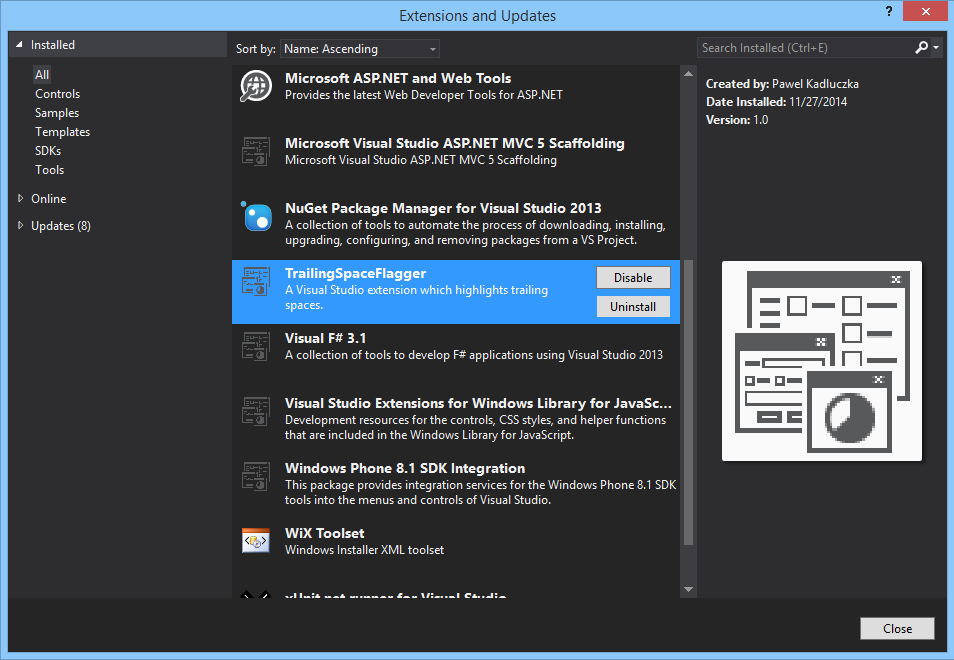
If you have too many whitespaces or just think it does not work for you you can uninstall or disable the extension by going to Tools -> Extensions and Updates find the Trailing Space Flagger in the installed extensions and click the “Remove” or “Disable” button:
uninstall-flagger
As usual, the code is open source – you can find it on github.

The final version of the Store Functions for EntityFramework 6.1.1+ Code First convention released

Today I posted the final version of the Store Functions for Entity Framework Code First convention to NuGet. The instructions for downloading and installing the latest version of the package to your project are as described in my earlier blog post only you no longer have to select the “Include Pre-release” option when using UI or use the –Pre option when installing the package with the Package Manager Console. If you installed a pre-release version of this package to your project and would like to update to this version just run the Update-Package EntityFramework.CodeFirstStoreFunctions command from the Package Manager Console.

What’s new in this version?

This new version contains only one addition comparing to the beta-2 version – the ability to specify the name of the store type for parameters. This is needed in cases where a CLR type can be mapped to more than one store type. In case of the Sql Server provider there is only one type like this – the xml type. If you look at the Sql Server provider code (SqlProviderManifest.cs ln. 409) you will see that the store xml type is mapped to the EDM String type. This mapping is unambiguous when going from the store side. However the type inference in the Code First Functions convention works from the other end. First we have a CLR type (e.g. string) which maps to the EDM String type which is then used to find the corresponding store type by asking the provider. For the EDM String type the Sql Server the provider will return (depending on the facets) one of the nchar, nvarchar, nvarchar(max), char, varchar, varchar(max) types but it will never return the xml type. This makes it basically impossible to use the xml type when mapping store functions using the Code First Functions convention even though this is possible when using Database First EDMX based models.
Because, in general case, the type inference will not always work if multiple store types are mapped to one EDM Type I made it possible to specify the store type of a parameter using the new StoreType property of the ParameterTypeAttribute. For instance if you had a stored procedure called GetXmlInfo that takes an xml typed in/out parameter and returns some data (kind of a more advanced (spaghetti?) scenario but came from a real world application where the customer wanted to replace EDMX with Code First so they decided to use Code First Functions to map store functions and this was the only stored procedure they had problems with) you would use the following method to invoke this stored procedure:

[DbFunctionDetails(ResultColumnName = "Number")]
[DbFunction("MyContext", "GetXmlInfo")]
public virtual ObjectResult<int> GetXmlInfo(
    [ParameterType(typeof(string), StoreType = "XML")] ObjectParameter xml)
{
    return ((IObjectContextAdapter)this).ObjectContext
        .ExecuteFunction("GetXmlInfo", xml);
}

Because the parameter is in/out I had to use the ObjectParameter to pass the value and to read the value returned by the stored procedure. Because I used ObjectParameter I had to use the ParameterTypeAttribute to tell the convention what is the Clr type of the parameter. Finally, I also used the StoreType parameter which results in skipping asking the provider for the store type and using the type I passed.

That would be it. See my other blog posts here and here if you would like to see other supported scenarios. The code and issue tracking is on codeplex. Use and enjoy.

The final version of the Second Level Cache for EF6.1+ available.

This is it! Today I pushed the final version of the Second Level Cache for Entity Framework 6.1+ to NuGet. Now you no longer need to use -Pre when installing the package from the Package Manager Console nor remember to select the “Include Prerelease” option from the dropdown when installing the package using the “Manage NuGet Packages” window. The final version is functionally equivalent to the beta-2 version – there wasn’t a single change to the product code between the beta-2 version and this version. I would still encourage you to upgrade to the final version if you are using the beta-2 version.
There is also a new implementation of cache which uses Redis to store cached items. It was created by silentbobbert and you can get it from NuGet. I am pretty excited about this since it opens quite a few new possibilities. Try it out and see how it works.
Update/install, enjoy and file bugs (if you find any).

The Beta Version of Store Functions for EntityFramework 6.1.1+ Code First Available

This is very exciting! Finally after some travelling and getting the beta-2 version of the Second Level Cache for EF 6.1+ out the door I was able to focus on store functions for EF Code First. I pushed quite hard for the past two weeks and here it is – the beta version of the convention that enables using store functions (i.e. stored procedures, table valued functions etc.) in applications that use Code First approach and Entity Framework 6.1.1 (or newer). I am more than happy with the fixes and new features that are included in this release. Here is the full list:

  • Support for .NET Framework 4 – the alpha NuGet package contained only assemblies built against .NET Framework 4.5 and the convention could not be used when the project targeted .NET Framework 4. Now the package contains assemblies for both .NET Framework 4 and .NET Framework 4.5.
  • Nullable scalar parameters and result types are now supported
  • Support for type hierarchies – previously when you tried using a derived type the convention would fail because it was not able to find a corresponding entity set. This was fixed by Martin Klemsa in his contribution
  • Support for stored procedures returning multiple resultsets
  • Enabling using a different name for the method than the name of the stored procedure/function itself – a contribution from Angel Yordanov
  • Enabling using non-DbContext derived types (including static classes) as containers for store function method stubs and methods used to invoke store functions – another contribution from Angel Yordanov
  • Support for store scalar functions (scalar user defined functions)
  • Support for output (input/output really) parameters for stored procedures

This is a pretty impressive list. Let’s take a closer look at some of the items from the list.

Support for stored procedure returning multiple resultsets

Starting with version 5 Entity Framework runtime has a built-in support for stored procedures returning multiple resultsets (only when targeting .NET Framework 4.5). This is not a very well-known feature which is not very surprising given that up to now it was practically unusable. Neither Code First nor EF Tooling supports creating models with store functions returning multiple resultsets. There are some workarounds like dropping to ADO.NET in case of Code First (http://msdn.microsoft.com/en-us/data/JJ691402.aspx) or editing the Edmx file manually (and losing the changes each time the model is re-generated) for Database First but they do not really change the status of the native support for stored procedures returning multiple resultsets as being de facto an unfeature. This is changing now – it is now possible to decorate the method that invokes the stored procedure with the DbFunctionDetails attribute and specify return types for subsequent resultsets and the convention will pick it up and create metadata EF requires to execute such a stored procedure.

Using a different name for the method than the name of the stored procedure

When the alpha version shipped the name of method used to invoke a store function had to match the name of the store function. This was quite unfortunate since most of the time naming conventions used for database objects are different from naming conventions used in the code. This is now fixed. Now, the function name passed to the DbFunction attribute will be used as the name of the store function.

Support for output parameters

The convention now supports stored procedures with output parameters. I have to admit it ended a bit rough because of how the value of the output parameter is being set (at least in case of Sql Server) but if you are in a situation where you have a stored procedure with an output parameter it is better than nothing. The convention will treat a parameter as an output parameter (in fact it will be an input/output parameter) if the type of the parameter is ObjectParameter. This means you will have to create and initialize the parameter yourself before passing it to the method. This is because the output value (at least for Sql Server) is set after all the results returned by the stored procedure have been consumed. Therefore you need to keep a reference to the parameter to be able to read the output value after you have consumed the results of the query. In addition because the actual type of the parameter will be only known at runtime and not during model discovery all ObjectParameter parameters have to be decorated with the ParameterTypeAttribute which specifies the type that will be used to build the model. Finally the name of the parameter in the method must match the name of the parameter in the database (yeah, I had to debug EF code to figure out why things did not work) – fortunately casing does not matter. As I said – it’s quite rough but should work once you align all the moving pieces correctly.

Exmple 1

The following example illustrates how to use the functionality described above. It uses a stored procedure with an output parameter and returning multiple resultsets. In addition the name of the method used to invoke the store procedure (MultipleResultSets) is different from the name of the stored procedure itself (CustomersOrdersAndAnswer).

internal class MultupleResultSetsContextInitializer : DropCreateDatabaseAlways<MultipleResultSetsContext>
{
    public override void InitializeDatabase(MultipleResultSetsContext context)
    {
        base.InitializeDatabase(context);

        context.Database.ExecuteSqlCommand(
        "CREATE PROCEDURE [dbo].[CustomersOrdersAndAnswer] @Answer int OUT AS " +
        "SET @Answer = 42 " +
        "SELECT [Id], [Name] FROM [dbo].[Customers] " +
        "SELECT [Id], [Customer_Id], [Description] FROM [dbo].[Orders] " +
        "SELECT -42 AS [Answer]");
    }

    protected override void Seed(MultipleResultSetsContext ctx)
    {
        ctx.Customers.Add(new Customer
        {
            Name = "ALFKI",
            Orders = new List<Order>
                {
                    new Order {Description = "Pens"},
                    new Order {Description = "Folders"}
                }
        });

        ctx.Customers.Add(new Customer
        {
            Name = "WOLZA",
            Orders = new List<Order> { new Order { Description = "Tofu" } }
        });
    }
}

public class Customer
{
    public int Id { get; set; }
    public string Name { get; set; }
    public virtual ICollection<Order> Orders { get; set; }
}

public class Order
{
    public int Id { get; set; }
    public string Description { get; set; }
    public virtual Customer Customer { get; set; }
}

public class MultipleResultSetsContext : DbContext
{
    static MultipleResultSetsContext()
    {
        Database.SetInitializer(new MultupleResultSetsContextInitializer());
    }

    protected override void OnModelCreating(DbModelBuilder modelBuilder)
    {
        modelBuilder.Conventions.Add(
            new FunctionsConvention<MultipleResultSetsContext>("dbo"));
    }

    public DbSet<Customer> Customers { get; set; }
    public DbSet<Order> Orders { get; set; }

    [DbFunction("MultipleResultSetsContext", "CustomersOrdersAndAnswer")]
    [DbFunctionDetails(ResultTypes = 
        new[] { typeof(Customer), typeof(Order), typeof(int) })]
    public virtual ObjectResult<Customer> MultipleResultSets(
        [ParameterType(typeof(int))] ObjectParameter answer)
    {
        return ((IObjectContextAdapter)this).ObjectContext
            .ExecuteFunction<Customer>("CustomersOrdersAndAnswer", answer);
    }
}

class MultipleResultSetsSample
{
    public void Run()
    {
        using (var ctx = new MultipleResultSetsContext())
        {
            var answerParam = new ObjectParameter("Answer", typeof (int));

            var result1 = ctx.MultipleResultSets(answerParam);

            Console.WriteLine("Customers:");
            foreach (var c in result1)
            {
                Console.WriteLine("Id: {0}, Name: {1}", c.Id, c.Name);
            }

            var result2 = result1.GetNextResult<Order>();

            Console.WriteLine("Orders:");
            foreach (var e in result2)
            {
                Console.WriteLine("Id: {0}, Description: {1}, Customer Name {2}", 
                    e.Id, e.Description, e.Customer.Name);
            }

            var result3 = result2.GetNextResult<int>();
            Console.WriteLine("Wrong Answer: {0}", result3.Single());

            Console.WriteLine("Correct answer from output parameter: {0}", 
               answerParam.Value);
        }
    }
}

The first half of the sample is just setting up the context and is rather boring. The interesting part starts at the MultipleResultSets method. The method is decorated with two attributes – the DbFunctionAttribute and the DbFunctionDetailsAttribute. The DbFunctionAttribute tells EF how the function will be mapped in the model. The first parameter is the namespace which in case of Code First is typically the name of the context type. The second parameter is the name of the store function in the model. The convention treats it also as the name of the store function. Note that this name has to match the name of the stored procedure (or function) in the database and also the name used in the ExecuteFunction call. The DbFunctionDetailsAttribute is what makes it possible to invoke a stored procedure returning multiple resultsets. The ResultTypes parameter allows specifying multiple types each of which defines the type of items returned in subsequent resultsets. The types have to be types that are part of the model or, in case of primitive types, they have to have an Edm primitive type counterpart. In our sample the stored procedure returns Customer entities in the first resultset, Order entities in the second resultset and int values in the third resultset. One important thing to mention is that the first type in the ResultTypes array must match the generic type of the returned ObjectResult. To invoke the procedure (let’s ignore the parameter for a moment) you just call the method and enumerate the results. Once the results are consumed you can move to the next resultset. You do it by calling the GetNextResult<T> method where T is the element type of the next resultset. Note that you call the GetNextResult<T> on the previously returned ObjectResult<> instance. Finally let’s take a look at the parameter. As described above it is of the ObjectParameter type to indicate an output parameter. It is decorated with the ParameterTypeAttribute which tells what is the type of the attribute. Its name is the same as the name of the parameter in the stored procedure (less the casing). We create an instance of this parameter before invoking the stored procedure, enumerate all the results and only then read the value. If you tried reading the value before enumerating all the resultsets it would be null.
Running the sample code produces the following output:

Customers:
Id: 1, Name: ALFKI
Id: 2, Name: WOLZA
Orders:
Id: 1, Description: Pens, Customer Name ALFKI
Id: 2, Description: Folders, Customer Name ALFKI
Id: 3, Description: Tofu, Customer Name WOLZA
Wrong Answer: -42
Correct answer from output parameter: 42
Press any key to continue . . .

Enabling using non-DbContext derived types (including static classes) as containers for store function method stubs and methods used to invoke store functions

In the alpha version all the methods that were needed to handle store functions had to live inside a DbContext derived class (the type was a generic argument to the FunctionsConvention<T> where T was constrained to be a DbContext derived type). While this is a convention used by EF Tooling when generating code for Database First approach it is not a requirement. Since it blocked some scenarios (e.g. using extension methods which have to live in a static class) the requirement has been lifted by adding a non-generic version of the FunctionsConvention which takes the type where the methods live as a constructor parameter.

Support for store scalar functions

This is another a not very well-known EF feature. EF actually knows how to invoke user defined scalar functions. To use a scalar function you need to create a method stub. Method stubs don’t have implementation but when used inside a query they are recognized by the EF Linq translator and translated to a udf call.

Example 2
This example shows how to use non-DbContext derived classes for methods/method stubs and how to use scalar UDFs.

internal class ScalarFunctionContextInitializer : DropCreateDatabaseAlways<ScalarFunctionContext>
{
    public override void InitializeDatabase(ScalarFunctionContext context)
    {
        base.InitializeDatabase(context);

        context.Database.ExecuteSqlCommand(
            "CREATE FUNCTION [dbo].[DateTimeToString] (@value datetime) " + 
            "RETURNS nvarchar(26) AS " +
            "BEGIN RETURN CONVERT(nvarchar(26), @value, 109) END");
    }

    protected override void Seed(ScalarFunctionContext ctx)
    {
        ctx.People.AddRange(new[]
        {
            new Person {Name = "John", DateOfBirth = new DateTime(1954, 12, 15, 23, 37, 0)},
            new Person {Name = "Madison", DateOfBirth = new DateTime(1994, 7, 3, 11, 42, 0)},
            new Person {Name = "Bronek", DateOfBirth = new DateTime(1923, 1, 26, 17, 11, 0)}
        });
    }
}

public class Person
{
    public int Id { get; set; }
    public string Name { get; set; }
    public DateTime DateOfBirth { get; set; }
}

internal class ScalarFunctionContext : DbContext
{
    static ScalarFunctionContext()
    {
        Database.SetInitializer(new ScalarFunctionContextInitializer());
    }

    public DbSet<Person> People { get; set; }

    protected override void OnModelCreating(DbModelBuilder modelBuilder)
    {
        modelBuilder.Conventions.Add(
            new FunctionsConvention("dbo", typeof (Functions)));
    }
}

internal static class Functions
{
    [DbFunction("CodeFirstDatabaseSchema", "DateTimeToString")]
    public static string DateTimeToString(DateTime date)
    {
        throw new NotSupportedException();
    }
}

internal class ScalarFunctionSample
{
    public void Run()
    {
        using (var ctx = new ScalarFunctionContext())
        {
            Console.WriteLine("Query:");

            var bornAfterNoon =
               ctx.People.Where(
                 p => Functions.DateTimeToString(p.DateOfBirth).EndsWith("PM"));

            Console.WriteLine(bornAfterNoon.ToString());

            Console.WriteLine("People born after noon:");

            foreach (var person in bornAfterNoon)
            {
                Console.WriteLine("Name {0}, Date of birth: {1}",
                    person.Name, person.DateOfBirth);
            }
        }
    }
}

In the above sample the method stub for the scalar store function lives in the Functions class. Since this class is static it cannot be a generic argument to the FunctionsConvention<T> type. Therefore we use the non-generic version of the convention to register the convention (in the OnModelCreating method).
The method stub is decorated with the DbFunctionAttribute which tells the EF Linq translator what function should be invoked. The important thing is that scalar store functions operate on a lower level (they exist only in the S-Space and don’t have a corresponding FunctionImport in the C-Space) and therefore the namespace used in the DbFunctionAttribute is no longer the name of the context but has always to be CodeFirstDatabaseSchema. Another consequence is that the return and parameter types must be of a type that can be mapped to a primitive Edm type. Once all this conditions are met you can use the method stub in Linq queries. In the sample the function is converting the date of birth to a string in a format which ends with “AM” or “PM”. This makes it possible to easily find people who were born before or after noon just by checking the suffix. All this happens on the database side – you can tell this by looking at the results produced when running this code which contain the SQL query the linq query was translated to:

Query:
SELECT
    [Extent1].[Id] AS [Id],
    [Extent1].[Name] AS [Name],
    [Extent1].[DateOfBirth] AS [DateOfBirth]
    FROM [dbo].[People] AS [Extent1]
    WHERE [dbo].[DateTimeToString]([Extent1].[DateOfBirth]) LIKE N'%PM'
People born after noon:
Name John, Date of birth: 12/15/1954 11:37:00 PM
Name Bronek, Date of birth: 1/26/1923 5:11:00 PM
Press any key to continue . . .

That’s pretty much it. The convention ships on NuGet – the process of installing the package is the same as it was for the alpha version and can be found here. If you are already using the alpha version in your project you can upgrade the package to the latest version with the Update-Package command. The code (including the samples) is on codeplex.
I would like to thank again Martin and Angel for their contributions.
Play with the beta version and report bugs before I ship the final version.